On this page
How Secure Web Access Works Secure Web Access Fundamentals The Modern Web Security Challenge Secure Web Gateway Fundamentals Secure Web Access Architecture How a Web Access Request Works Web Filtering URL and Category Control Application Control Threat Protection DNS Security Policy Enforcement Monitoring & Visibility Remote & Hybrid Workforce Secure Web Access vs. Traditional Secure Web Access with SASE Common Use Cases Example User Journey Security Principles Benefits FAQ Key TakeawaysCOSGrid Secure Web Access
Secure Web Gateway | Web Filtering | Application Control
01 — OVERVIEW
How does Secure Web Access work?
COSGrid Secure Web Access places a policy decision between the user and the internet.
When a user opens a website or web application, the request is evaluated against the organization's security policy before the connection to the destination is made.
The process follows six core steps
User requests a website or web application
The request reaches Secure Web Access enforcement on the device
The applicable user and group policy is identified
The destination is evaluated based on domain, URL, IP address, category or application
The request is allowed, blocked or excluded from filtering
The outcome is recorded for administrators and security monitoring
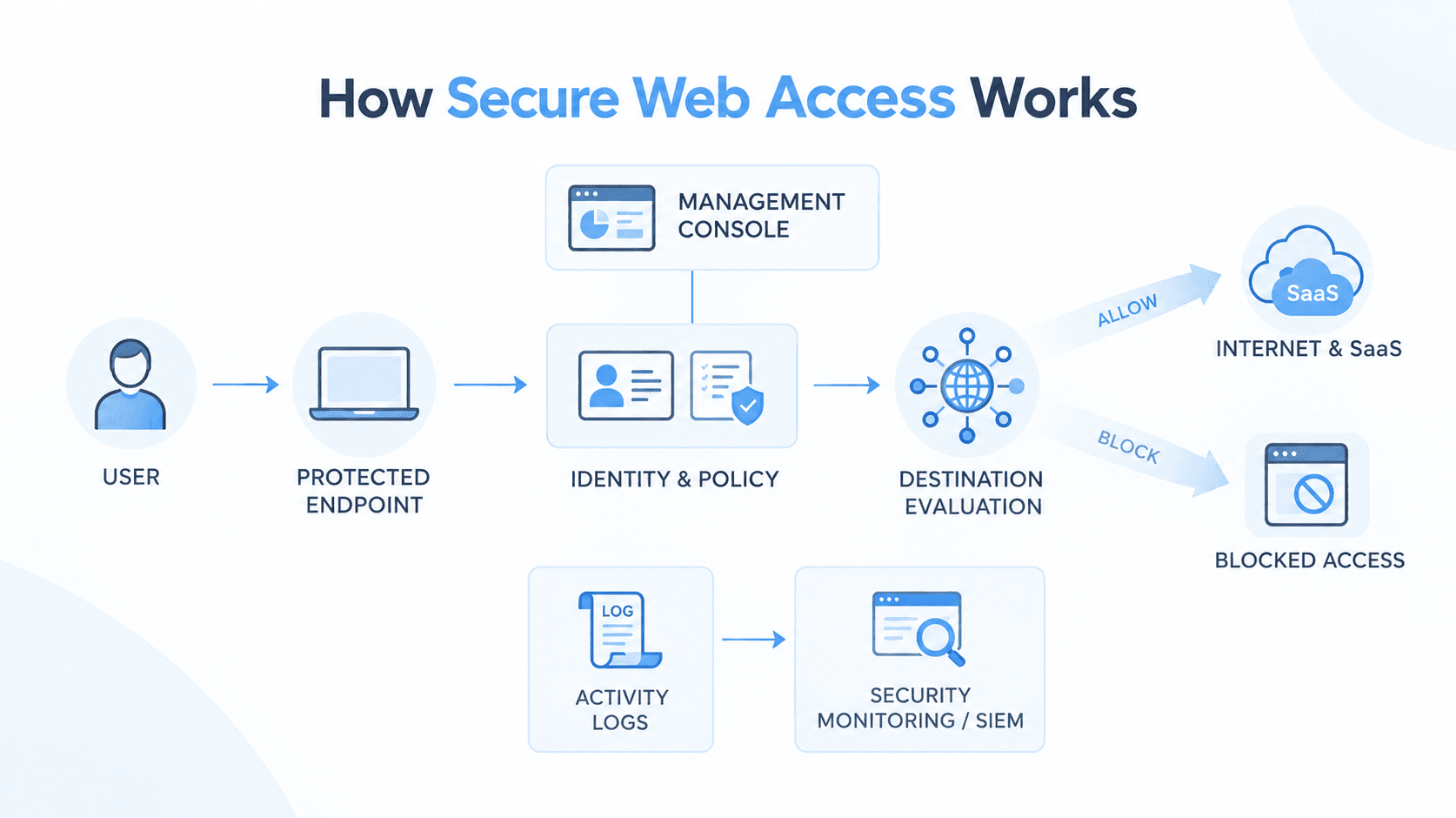
Policies are managed centrally and enforced on protected devices, allowing the same web access rules to apply regardless of whether the user is working from the office, home or another location.
02 — WHY IT MATTERS
Secure Web Access fundamentals
What is Secure Web Access?
Secure Web Access is a security service that controls access to websites and web applications based on organizational policy.
For every web request, it answers a simple question:
Should this user be allowed to reach this destination?
The decision is based on the user's applicable policy and characteristics of the requested destination, including its domain, IP address, category and application.
Why do organizations need Secure Web Access?
Modern users access business applications, SaaS platforms and internet services from many different locations.
This creates a need for consistent web access controls that are not dependent only on the corporate network.
Secure Web Access helps organizations:
- Reduce exposure to malicious and phishing destinations
- Enforce acceptable-use policies
- Control SaaS and web application usage
- Apply different access policies to users and groups
- Maintain visibility into allowed and blocked web activity
03 — SECURITY CHALLENGES
The modern web security challenge
Why is web access harder to secure?
Traditional web security models often relied on a central office network or internet gateway. Modern organizations have users working from multiple locations and accessing applications directly from the internet.
This creates several challenges:
The common challenge is that user location is no longer a reliable enforcement point.
Secure Web Access moves enforcement to the protected device and bases decisions on user and group policy.
04 — SWG FUNDAMENTALS
Secure Web Gateway Fundamentals
What is a Secure Web Gateway?
A Secure Web Gateway (SWG) is a security control that enforces an organization's web security policy on user traffic. It can:
- Control web traffic
- Enforce access policies
- Block destinations classified as dangerous
- Filter websites and applications
- Record web activity for visibility
Secure Web Gateway vs Secure Web Access
05 — ARCHITECTURE
Secure Web Access Architecture
How is Secure Web Access structured?
COSGrid Secure Web Access separates centralized policy management from local endpoint enforcement.
What does each layer do?
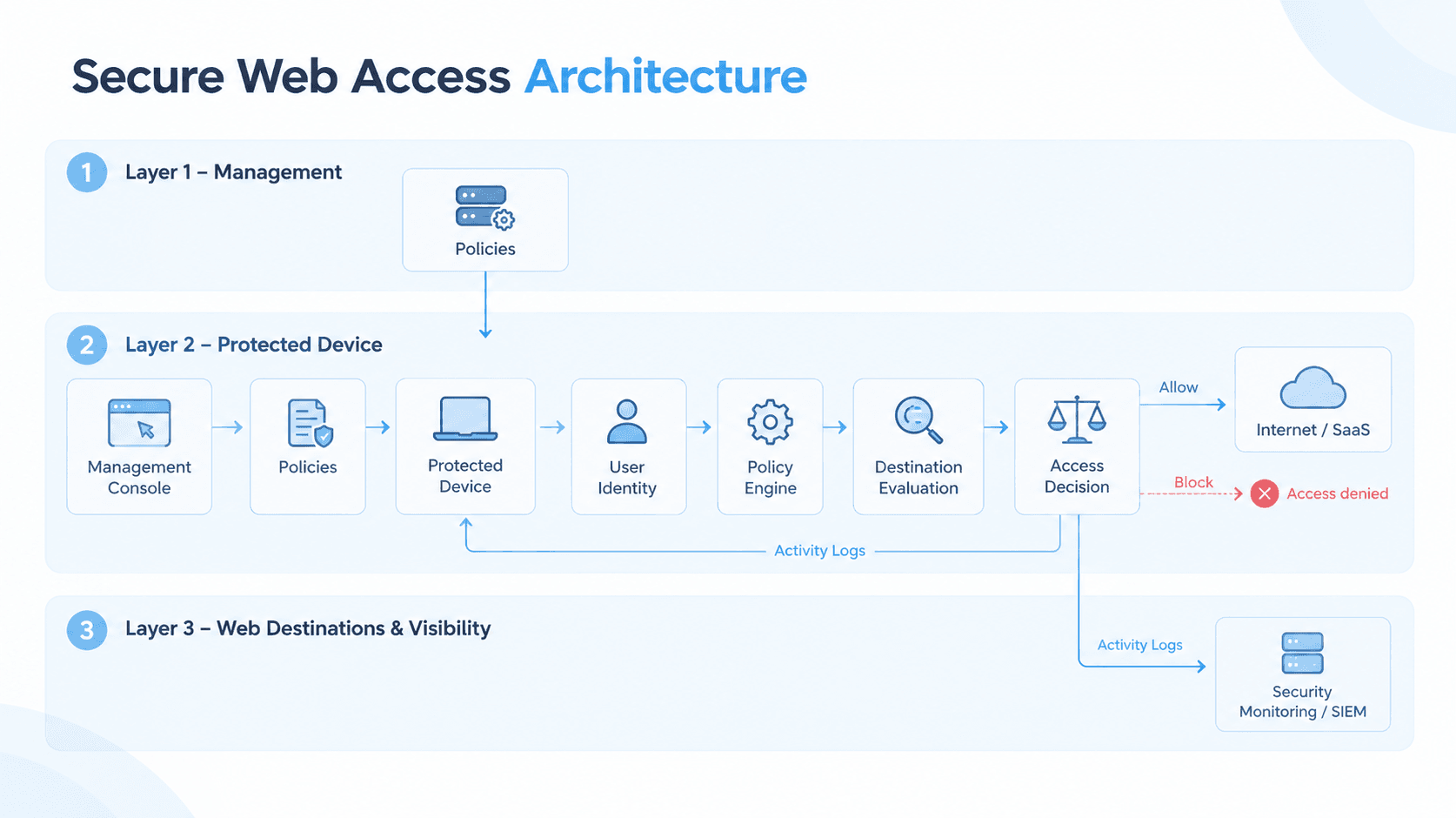
The console defines what the policy is, while the protected device applies it. The endpoint continues enforcing the last received policy if it temporarily loses contact with the management console.
06 — ACCESS FLOW
How a web access request works?
What happens when a user opens a website?
1. User requests a website
The user opens a website or web application by entering an address, clicking a link or launching a web-based application.
2. The request reaches security enforcement
The request is directed to Secure Web Access enforcement on the protected device.
3. User and policy context are identified
The user's identity and group memberships are used to determine the policy that applies to the request.
4. The destination is evaluated
The destination is evaluated against applicable rules, including:
- Domain
- IP address
- Web category
- Web application
- Custom URL lists
5. Security controls are applied
Configured security controls determine whether the destination should be allowed or blocked.
Threat-related categories such as malicious content, phishing and fraud, and botnet or command-and-control are blocked by default.
6. Access decision is made
The request can be:
- Allowed
- Blocked
- Excluded from filtering
- Handled using the default action — blocked requests display a policy block page instead of a generic browser error.
7. Activity is recorded
The decision is recorded with information such as the user, device, destination, category or application and action taken. Logs can also be forwarded to SIEM platforms.
07 — WEB FILTERING
Web Filtering
How does web filtering work?
Web filtering compares requested destinations against configured security policies.
COSGrid Secure Web Access supports multiple filtering methods:
Allow-list and Block-list policies
Organizations can use different policy approaches.
Block-list approach:
Allow general web access while blocking specified categories, applications or destinations.
Allow-list approach:
Allow only approved destinations and block everything else through the default action.
08 — URL & CATEGORY CONTROL
URL and Category Control
How does URL filtering work?
URL filtering provides precise control over specific web destinations.
Administrators can define policies based on:
- Website or domain
- Wildcard domain
- IP address or subnet
- Web category
- Application
- Custom URL list
- User
- Group
For example, a policy could block a particular file-sharing site for all users while allowing an approved business application.
Why category-based filtering?
Category-based policies allow organizations to control entire classes of destinations through a single policy instead of maintaining large lists of individual websites.
09 — APPLICATION CONTROL
Application Control
How does application filtering work?
Application filtering allows organizations to control web applications and SaaS services as a whole.
Instead of maintaining individual domain rules for every component of an application, administrators can define policy around the application itself.
Organizations can:
- Allow sanctioned applications
- Restrict unsanctioned applications
- Apply different application policies to different groups
- Combine application rules with category-based controls
This provides a practical way to govern SaaS usage and improve visibility into web applications being accessed by users.
10 — THREAT PROTECTION
Threat Protection
How does Secure Web Access help protect users from web threats?
Secure Web Access helps reduce exposure by blocking destinations classified as dangerous before the connection is made.
Threat protection is destination-based and is intended to complement, rather than replace, endpoint security and other security controls.
11 — DNS SECURITY
DNS Security
How does DNS security work with Secure Web Access?
DNS security provides an additional filtering layer by evaluating DNS lookups before a device connects to a destination.
This can help stop known malicious or unwanted domains early in the connection process.
COSGrid DNS security provides its own user- and group-based policies and works as a complementary layer to web filtering. It applies when the device is connected to COSGrid's secure access service.
DNS Security + Web Filtering
Together, the two layers provide defense in depth.
12 — POLICY ENFORCEMENT
Policy Enforcement
How does policy-based web access work?
Every access decision follows the same basic model:
Available actions
How are rules evaluated?
Secure Web Access evaluates rules in a predictable order:
This allows specific business exceptions to be defined while maintaining a broader organizational security policy.
Policy lifecycle
- Set up users and groups
- Select the policy type
- Define rules and actions
- Assign users or groups
- Configure the default action
- Enable and validate
- Monitor and refine
13 — MONITORING & VISIBILITY
Monitoring and Visibility
What visibility does Secure Web Access provide?
Every access decision can be recorded so security and IT teams can understand web activity and investigate policy events.
Administrators can see:
- Web destinations requested
- User and device
- Allowed or blocked outcome
- Matching category or application
- Requesting application
- Activity dashboards
- Security monitoring information
Logs can also be forwarded to external security platforms including Splunk and Elasticsearch, including CEF-formatted events.
Visibility supports
- Audit evidence
- Incident investigation
- Policy tuning
- Security operations
- SIEM correlation
14 — REMOTE & HYBRID WORK
Remote and Hybrid Workforce
How does Secure Web Access protect remote users?
Because enforcement occurs on the protected device, the web access policy can follow the user across different locations.
The same policy can apply when a user works:
Remote and hybrid users do not need a different web policy simply because their network location changes.
If the device temporarily loses contact with the management console, it continues enforcing the last policy it received.
Secure Web Access protection applies to devices where the COSGrid endpoint agent is installed.
15 — TRADITIONAL VS. SECURE WEB ACCESS
Secure Web Access VS. Traditional Approach
How is Secure Web Access different?
Secure Web Access focuses specifically on user-to-internet web access and works alongside traditional network firewalls rather than replacing them
16 — SECURE WEB ACCESS & SASE
Secure Web Access with SASE
How does Secure Web Access fit into SASE?
SASE combines networking and security controls around users, applications and access policies rather than relying solely on network location.
Within COSGrid's SASE portfolio:
Secure Web Access provides the Secure Web Gateway layer for internet and web access, while MicroZAccess provides Zero Trust access to private applications.
17 — USE CASES
Common use cases
Apply consistent web access policies across employees.
Control access to inappropriate, unsafe or non-compliant web categories.
Reduce exposure to destinations classified as phishing, malicious content or command-and-control.
Allow sanctioned applications and restrict unsanctioned applications
Permit only explicitly approved business applications and destinations.
Apply different web access policies to different groups.
Maintain records of access decisions and forward activity to SIEM platforms.
18 — USER JOURNEY
Example User Journey
EXAMPLE USER JOURNEY
Consider Priya, who works in the finance team.
Her organization blocks the file-sharing category for employees but allows one approved file-sharing application. The finance team also needs access to a specific partner banking portal.
1. Priya opens the banking portal
Secure Web Access identifies Priya and her finance group membership.
2. Her policy is assembled
Organization-wide rules and finance-specific rules are combined.
3. The destination is evaluated
The banking portal matches the finance group's allow rule.
4. Access is allowed
The banking portal loads normally.
5. Priya opens a personal file-sharing website
The destination belongs to a blocked category.
6. Access is blocked
Priya receives a policy block page.
7. Priya opens the approved file-sharing application
The application matches an explicit allow rule and access is permitted.
8. Activity is recorded
The access decisions are recorded for security visibility.
19 — SECURITY PRINCIPLES
Security Principles
Least-privilege web access
Users receive only the web access permitted by their policy.
Policy-based control
Access decisions are based on explicit organizational policies.
Consistent enforcement
The same policy can be enforced across protected devices and locations.
Predictable behavior
Rules follow a documented evaluation order with a default action for unmatched requests.
Visibility
Security teams can see what was accessed, what was blocked and which policy produced the decision.
Defense in depth
DNS security, web filtering, threat-category blocking and other configured controls work together with the organization's broader security controls.
20 — BENEFITS
Benefits
21 — FAQ
Frequently Asked Questions
What is Secure Web Access?
Secure Web Access is a security service that controls and protects access to websites and web applications based on organizational policy.
What is a Secure Web Gateway?
A Secure Web Gateway is a security control that enforces web security policies on user traffic. COSGrid Secure Web Access is COSGrid's SWG offering.
How does web filtering work?
Web filtering evaluates requested destinations against configured rules and allows or blocks them based on categories, applications, domains, IP addresses or custom URL lists.
What is URL filtering?
URL filtering controls access to specific web destinations using domains, wildcard domains, IP addresses or custom URL lists.
How does Secure Web Access protect against phishing?
Destinations classified under phishing and fraud are blocked by default.
How does Secure Web Access help prevent malware?
It reduces exposure by blocking destinations classified as malicious content or botnet and command-and-control infrastructure. Configured file-transfer controls can also restrict files based on type and size.
What is the difference between Secure Web Access and a traditional web proxy?
A traditional proxy commonly relies on traffic being routed through a central location. Secure Web Access applies policy on the protected device and uses user and group context.
What is the difference between Secure Web Access and a firewall?
A firewall primarily controls network traffic between networks and systems. Secure Web Access focuses specifically on user access to web destinations.
Can Secure Web Access control SaaS applications?
Yes. Application-based filtering can allow or restrict web applications and SaaS services
22 — KEY TAKEAWAYS
Key Takeaways

COSGrid Secure Web Access is a Secure Web Gateway that evaluates web access requests against organizational policy.
Policy can be based on users and groups.
Web filtering supports categories, applications, domains, IP addresses and custom URL lists.
Requests follow a predictable evaluation order: Bypass → Allow → Block → Default.
Threat-related categories such as malicious content, phishing and fraud, and botnet/C2 are blocked by default.
Enforcement occurs on protected devices, allowing policies to follow users across locations.
Web access activity is recorded for security visibility and monitoring.
DNS security provides an additional filtering layer.
Secure Web Access provides the internet-facing SWG layer of the COSGrid SASE portfolio, while MicroZAccess protects private application access.