On this page
Overview What Is Agentless ZTNA? Connectivity Is Not Authorization Why Agentless Access Exists How Access Requests Work Identity and Authentication Access Decision Signals One Application, Not Network What Happens When Access Is Denied? Agentless ZTNA vs VPN Agentless vs Agent-Based ZTNA Where SwiftZAccess Is Used Security Principles Common Questions Key TakeawaysCOSGrid SwiftZAccess — Agentless ZTNA
Give users secure access to one application — not your network — with nothing to install.
01 — OVERVIEW
Overview
COSGrid SwiftZAccess is an agentless Zero Trust Network Access (ZTNA) solution that provides browser-based access to internal web applications without requiring client software on the user's device. It is designed for contractors, partners, vendors, auditors, temporary workers, BYOD users, and other users accessing applications from unmanaged devices.
Unlike a traditional VPN, SwiftZAccess does not place users on the corporate network. Unlike agent-based ZTNA, it does not require endpoint software to be installed.
The access journey is simple:
Open the application → verify identity → evaluate policy → access one application → re-authorize every request → record the decision
This changes the security model from network connectivity to application-level authorization.
02 — THE AGENTLESS ZTNA MODEL
What Is Agentless ZTNA?
Agentless ZTNA is Zero Trust Network Access that provides application-level access through a standard web browser without requiring client software on the user's device.
Instead of giving a device access to a network, agentless ZTNA gives an authenticated user access to specific applications according to policy.
This model is particularly useful when an organisation does not control the endpoint. Contractors may use personal laptops, partners may prohibit third-party software, auditors may only require access for a few days, and temporary users may need access without going through a full endpoint deployment process.
COSGrid SwiftZAccess applies this model to internal web applications using identity-driven, least-privilege access controls.
03 — NOT AUTHORIZATION
The Core Idea: Connectivity Is Not Authorization
Traditional remote-access models often begin by establishing network connectivity.
Zero Trust changes the question from:
That distinction matters.
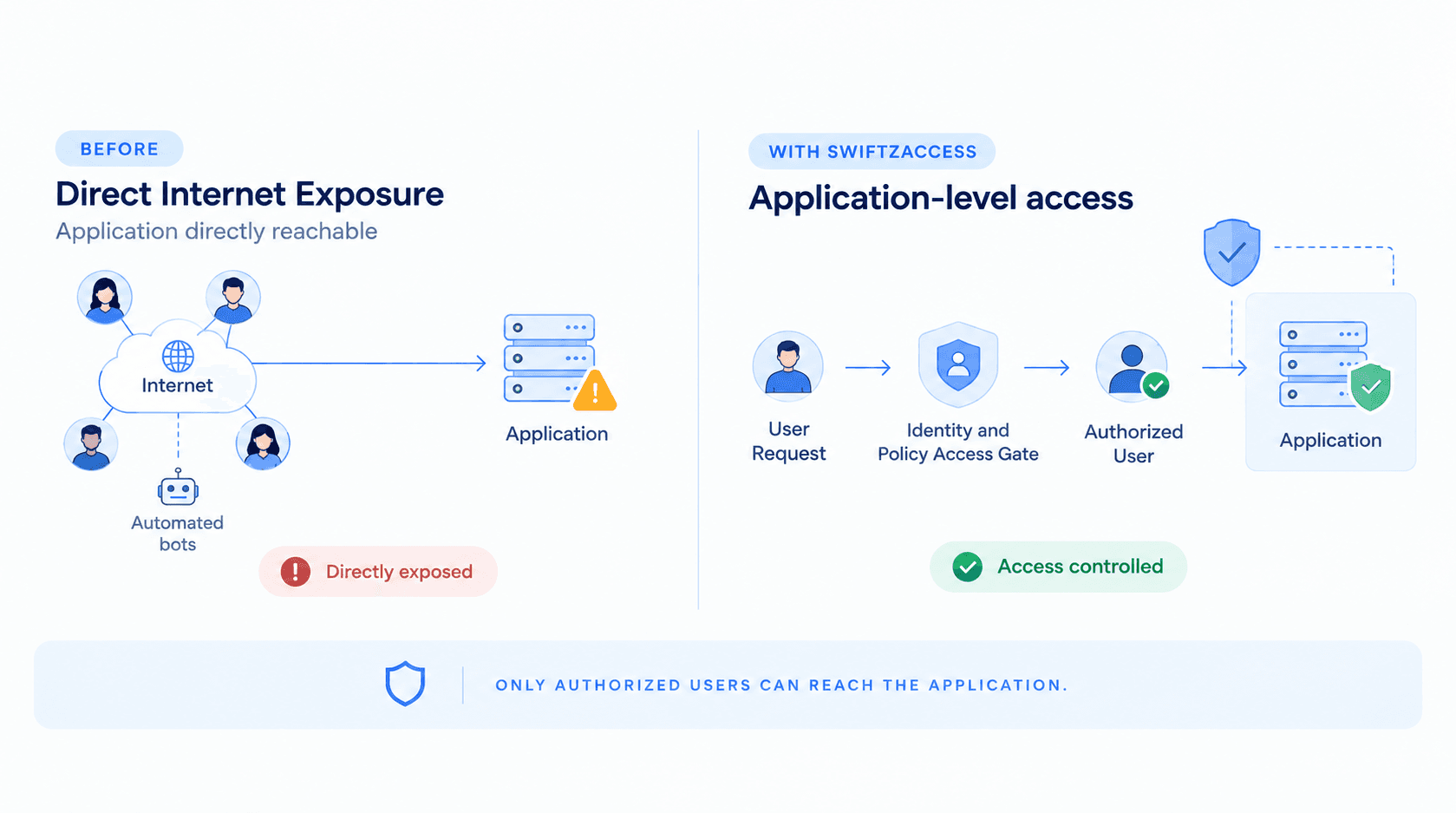
A VPN establishes network connectivity first and then relies on network controls to determine what the connected user can reach. SwiftZAccess takes the opposite approach: authorization happens before access to the application is granted.
The user does not join the corporate network, install an endpoint agent, or receive broad network access.
Instead, SwiftZAccess evaluates whether a specific user should access a specific application in a specific context.
The result is least-privilege, browser-based access to internal web applications without directly exposing the application to the internet.
04 — WHY IT EXISTS
Why Agentless Access Exists
Modern organisations frequently need to provide application access to users who are outside their managed endpoint environment.
These users may include:
- Contractors
- Partners
- Vendors
- Auditors
- Regulators
- Temporary employees
- Seasonal workers
- M&A teams
- Employees using personal devices
- Third parties using devices already protected by another security agent
Traditional approaches create a difficult choice.
VPNs provide network-level connectivity. This can give third-party users more reach than they actually need and can increase the potential for lateral movement.
Virtual desktops can provide controlled access, but they introduce additional infrastructure, operational overhead, cost, and user friction.
Agent-based ZTNA provides strong controls for managed endpoints, but installing an agent is not always possible. A contractor may use a personal laptop, a partner may prohibit third-party software, or an auditor may need access only temporarily.
Agentless ZTNA addresses this access gap without requiring endpoint software deployment.
05 — ACCESS FLOW
How a SwiftZAccess Access Request Works
SwiftZAccess follows a seven-stage access flow. The key principle is that authorization happens before application access is granted and continues throughout the user's access.
.png "How a SwiftZAccess Access Request Works")
1. The User Requests Access
- The process begins when the user opens the application's normal web address. There is no endpoint agent to launch and no VPN client to connect. The user can use their own device and a modern web browser without installing software. For the organisation, this removes the need to distribute software, enrol the device, or manage an endpoint simply to provide access to one application. Most importantly, the user is not placed on the corporate network.
Security principle: the user is not placed onto the corporate network.
2. Identity Is Confirmed
- Once the access request begins, the user authenticates through the organisation's existing identity provider. SwiftZAccess supports identity providers using SAML 2.0 and OpenID Connect, allowing organisations to use their existing SSO infrastructure. If the identity provider requires MFA, that authentication flow remains part of the identity verification process. This means organisations do not need to create a separate password system for SwiftZAccess users.
- The identity provider answers: "Who is this user?" SwiftZAccess then uses that verified identity as an input to the application access decision.
Security principle: access begins with a verified identity rather than a trusted network location.
3. The Request Is Evaluated Against Policy
After identity verification, SwiftZAccess evaluates the access request against the policy associated with the requested application.
The decision can consider:
These signals become inputs to the access policy. SwiftZAccess follows a deny-by-default approach. Access is not granted unless the configured policy permits the request. The important distinction is that the policy applies to the application request, rather than simply establishing a trusted network session.
Security principle: access begins with a verified identity rather than a trusted network location.
4. Access Is Granted to One Application — or Refused
- If the request satisfies the configured policy, SwiftZAccess allows the user to reach the authorised application.
- If the request does not satisfy the policy, access is refused.
- The user does not receive access to the wider network.
- For example, a contractor may be authorised to access an internal ticketing application but not an internal database, administrative console, or another employee application. This creates a clear security boundary.
- The user gets access to what they need — not everything the network can reach.
- When access is denied, the decision is recorded with its reason for administrative visibility and audit.
Security principle: least privilege at the application level.
5. The Application Stays Hidden
- SwiftZAccess is designed so that protected internal applications do not need to be directly published to the public internet.
- Access is mediated through the SwiftZAccess access layer. This reduces direct internet exposure and prevents unauthorised internet users from simply discovering and connecting to exposed application services.
- The application therefore remains separated from the public attack surface while authorised users can still reach it through the approved access path.
- This approach can be described as application cloaking or zero-exposure application access.
Security principle: do not expose an internal application simply to make remote access possible.
6. Every Request Is Re-Authorized
- Authentication is not the end of authorization.
- With SwiftZAccess, every request is evaluated against the current access policy.
- This means that a policy change or user deactivation can take effect on a subsequent request rather than requiring administrators to wait for the original session to expire.
- User, team, and policy changes propagate across gateways within seconds. Administrative revocation or logout can also terminate access while the user is already working.
- This creates continuous authorization at the request level, where authorization follows the current policy rather than the age of the session.
A simple example
A contractor authenticates successfully and receives access to an internal application.
The contractor's project ends and the administrator removes the user's access.
The contractor makes another application request.
SwiftZAccess evaluates the new request against the updated policy and denies access.
The organisation does not have to depend on waiting for a long-lived session or token to naturally expire.
Security principle: authorization follows the current policy, not the age of the session.
7. Everything Is Recorded
Zero Trust access should be observable as well as enforceable. SwiftZAccess can record both allowed and denied access decisions for visibility, investigation, and audit. Access records can include the user's identity, relevant request context, and the reason for the outcome. These records can also be delivered to the organisation's SIEM environment.
This allows security and compliance teams to answer questions such as:
This creates an audit trail for access monitoring, security investigations, third-party access reviews, compliance evidence, and policy troubleshooting.
Security principle: Zero Trust access should be observable as well as enforceable.
06 — IDENTITY & AUTH
Identity and Authentication
SwiftZAccess connects application access with the organisation's existing identity infrastructure.
Supported identity integration includes:
This allows organisations to maintain a central identity source while applying application-specific access policies.
The identity provider answers:
This separation keeps identity management and application authorization connected without requiring a separate password estate.
07 — DECISION SIGNALS
What Does SwiftZAccess Consider for Access Decisions?
Agentless does not mean automatic trust.
Depending on the configured policy, SwiftZAccess can evaluate contextual information associated with an access request, including:
These signals are used as policy inputs. The browser-reported operating system and browser information should not be interpreted as equivalent to independently verified device health or device posture. The strength of the agentless model is providing application-level authorization without requiring software on the endpoint.
08 — ONE APP, NOT NETWORK
Access to One Application — Not to Your Network
The fundamental difference between agentless ZTNA and traditional VPN access is the security boundary.
User → VPN → Network → Applications
The user first receives network connectivity.
User → Identity → Policy → Application
The user does not receive general network access. A user authorised for one internal web application does not automatically receive access to other internal applications simply because those applications exist on the same network. This is the essence of least-privilege application access.
.png "Access to One Application — Not to Your Network")
09 — ACCESS DENIED
What Happens When Access Is Denied?
Zero Trust is not only about allowing the right requests. It is also about handling denied requests clearly.
When a request does not satisfy the configured policy:
- The request is refused.
- The user does not receive access to the protected application.
- The denial is recorded.
- The reason for the decision is available for administrative visibility.
- Updated policy can change the result for a future request.
This creates a direct relationship between identity, context, policy, application, and enforcement.
Instead of asking only:
"Why can't this user connect?"
Administrators can investigate the access decision based on the identity, context, policy, and application involved.
10 — ZTNA VS VPN
Agentless ZTNA vs VPN
The simplest distinction
VPN connects the user to the network.
Agentless ZTNA connects the authorised user to the application.
11 — AGENTLESS VS AGENT-BASED
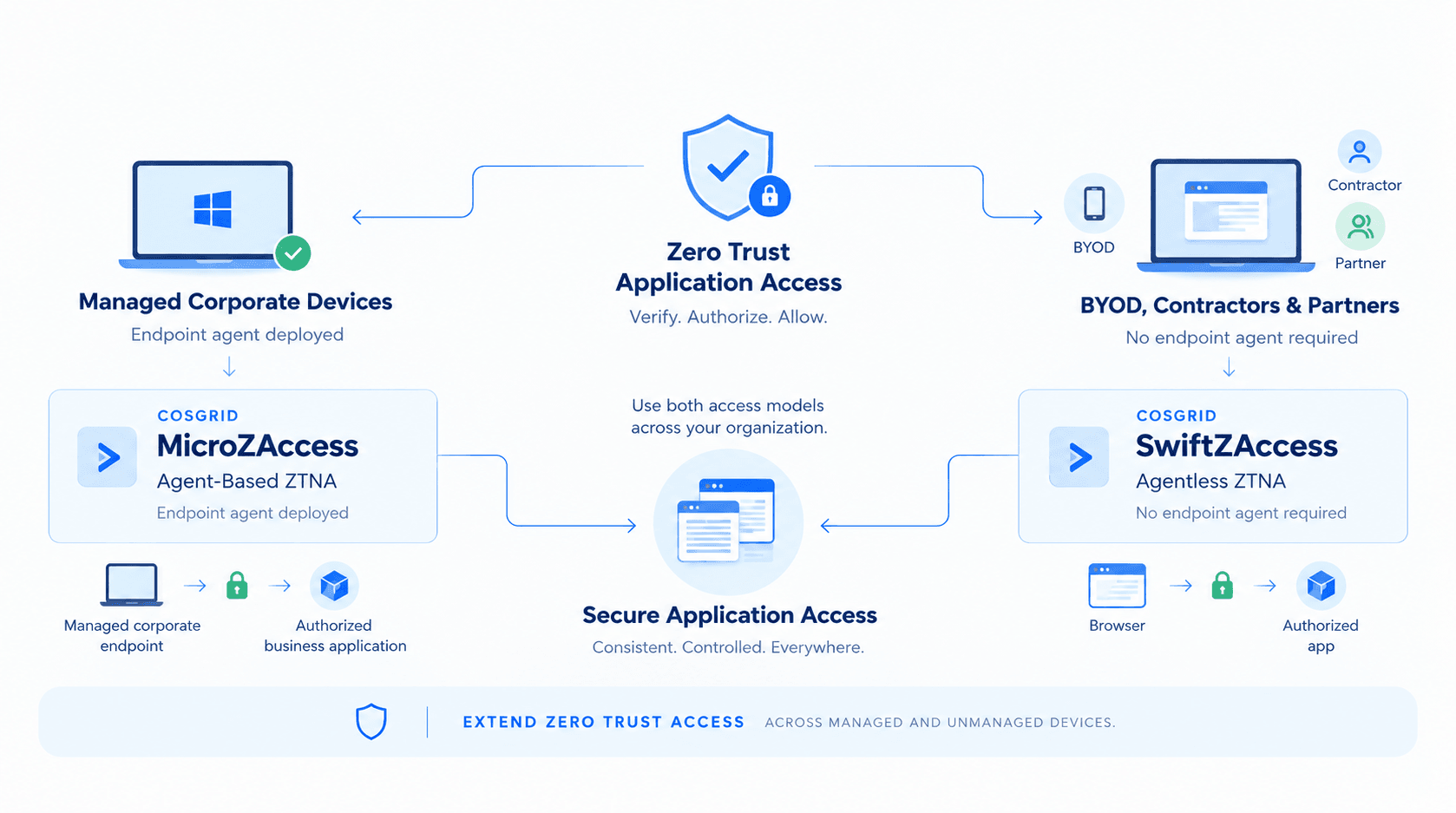
Agentless ZTNA vs Agent-Based ZTNA
SwiftZAccess is particularly suited for:
- Contractors
- Partners
- Vendors
- Auditors
- BYOD users
- Temporary workers
- Unmanaged devices
- Devices where another security agent is already installed
No endpoint software is required.
Agent-based ZTNA is particularly suited for:
- Managed corporate endpoints
- Employees
- Always-on access
- Multiple applications
- Deeper endpoint security controls
- Device posture enforcement
- Non-web protocols
Because software is installed on the endpoint, agent-based ZTNA can provide deeper device-level controls.
Why Organisations Can Use Both
Agentless and agent-based ZTNA do not have to compete.
A practical enterprise model can use:
MicroZAccess → managed corporate devices
SwiftZAccess → unmanaged, third-party and BYOD devices
This allows an organisation to apply the appropriate Zero Trust access model to each device population.
12 — WHERE IT'S USED
Where SwiftZAccess Is Used
Contractor Access
Give contractors access to the specific internal web applications required for their engagement without installing software on their personal devices. When the engagement ends, access can be revoked without requiring software removal from the contractor's device.
Third-Party and Vendor Access
Partners and vendors can access approved applications without receiving broad network-level connectivity. Policies can limit access according to identity, team, context, and application.
BYOD Access
Employees or temporary users can access approved internal web applications from personal devices without endpoint-agent deployment or device enrolment.
Auditor and Regulator Access
Auditors and regulators may require temporary access to specific applications or systems. SwiftZAccess provides application-specific access without requiring broad VPN accounts, while access decisions and denials can be recorded for audit visibility.
M&A and Day-One Access
During mergers, acquisitions, outsourcing, or organisational transitions, users may need application access before their devices can be fully integrated into the existing endpoint-management environment. Agentless ZTNA can provide selected web application access without waiting for a complete endpoint deployment programme.
Temporary and Seasonal Workforce
Temporary workers often need access for a limited period. SwiftZAccess provides application-level access without creating a permanent endpoint software footprint.
Existing SASE or Endpoint Agent Environments
Some organisations already operate endpoint security or SASE agents. Adding another traffic-intercepting agent can create operational and compatibility challenges.
Because SwiftZAccess requires no client software installation, it can provide a complementary access path for users and devices that cannot accommodate another endpoint agent.
13 — SECURITY PRINCIPLES
The Security Principles Behind SwiftZAccess
SwiftZAccess applies several core Zero Trust principles to browser-based application access.
1. Explicit Verification
Identity and access context are evaluated before access is granted.
2. Least Privilege
Users receive access to the applications they need rather than broad network access.
3. Deny by Default
A request is not permitted unless policy allows it.
4. Continuous Authorization
Access is evaluated on every request rather than being permanently trusted after login.
5. Application-Level Security
The application becomes the security boundary instead of the network.
6. No Endpoint Software Requirement
Users can access authorised web applications without installing a client on their devices.
7. Observable Access
Allow and deny decisions are recorded for visibility, investigation, and audit.
Together, these principles make agentless ZTNA particularly useful for third-party and unmanaged-device access.
14 — SECURITY PRINCIPLES
Frequently Asked Questions About Agentless ZTNA
What is SwiftZAccess?
COSGrid SwiftZAccess is an agentless ZTNA solution that provides browser-based access to specific internal web applications without installing client software. Users authenticate through the organisation's identity provider, and requests are evaluated against the applicable access policy before reaching the application.
What problem does SwiftZAccess solve?
SwiftZAccess provides secure application access for third parties and unmanaged devices without requiring broad network access or endpoint software. Access can be granted, monitored, and revoked according to policy.
What is the difference between ZTNA and VPN?
A VPN generally provides network-level connectivity, while ZTNA provides access to specific applications based on identity and policy. Agentless ZTNA avoids placing the user on the network and can continuously re-authorize application requests.
What is the difference between agentless and agent-based ZTNA?
Agent-based ZTNA installs software on the endpoint and can provide deeper device-level controls and support for a wider range of protocols. Agentless ZTNA works through the browser without endpoint software, making it suitable for unmanaged devices and third-party users. Organisations can use both models together.
Can agentless ZTNA replace a VPN?
For internal web applications, agentless ZTNA can replace many third-party VPN use cases. SwiftZAccess is focused on browser-accessible web applications and does not currently replace VPN access for every protocol.
How does agentless ZTNA improve security?
Agentless ZTNA removes the need to grant network-level access to users who need a specific application. SwiftZAccess applies deny-by-default access policies, keeps internal applications from being directly exposed to the internet, re-authorizes requests, and records access decisions.
How does SwiftZAccess protect internal applications?
Internal applications are not directly published to the internet. Users reach them through the access layer after the request has been authorised, reducing direct exposure and preventing unauthorised users from simply reaching exposed application services.
How quickly can access be revoked?
Access revocation can take effect for the user's subsequent access request. Logout or administrative revocation can terminate access without requiring administrators to wait for normal session or token expiration.
Does SwiftZAccess work on personal and unmanaged devices?
Yes. SwiftZAccess is designed for browser-based access from devices that the organisation does not manage. No endpoint client software is required, making it suitable for BYOD, contractors, partners, vendors, and other third-party users.
Can SwiftZAccess be deployed in our own environment?
Yes. SwiftZAccess is designed for self-hosted deployment in the customer's own infrastructure and country, allowing organisations to retain control of access policies, decisions, and security data within their deployment environment.
What applications does SwiftZAccess support?
SwiftZAccess currently supports internal web applications accessed over HTTP and HTTPS. Examples include portals, dashboards, web-based administrative interfaces, ERP/CRM front ends, ticketing applications, and partner portals.
SSH, RDP, VNC, and database access are not currently available as shipped agentless access capabilities.
What is the difference between SwiftZAccess and MicroZAccess?
What is the difference between SwiftZAccess and MicroZAccess?
Both provide Zero Trust access, but they address different device scenarios. MicroZAccess is agent-based ZTNA for managed devices, while SwiftZAccess is agentless and browser-based for unmanaged devices, contractors, partners, and BYOD users. Organisations can deploy both according to their device and application access requirements.
Does SwiftZAccess work with another security agent?
Yes. Because SwiftZAccess does not require endpoint software, it can operate without adding another endpoint agent to the device. This makes it useful in environments where an existing SASE, DLP, or endpoint-security agent is already installed.
15 — KEY TAKEAWAYS
Key Takeaways

Agentless ZTNA without client software installation
Access to specific applications rather than entire networks
Identity-driven access decisions
Deny-by-default policy enforcement
Context-aware authorization using configured access signals
Per-request authorization against current policy
Access revocation without waiting for normal session expiration
Internal applications that do not need to be directly published to the internet
Visibility into both allowed and denied requests
SIEM integration for access visibility and audit
Secure access for contractors, partners, vendors, auditors, BYOD users, and unmanaged devices
Complementary deployment with MicroZAccess for managed endpoints