
Removable Storage
Employees may copy customer information to USB and other removable storage.
Protect sensitive information across seven everyday data-exit channels with COSGrid Endpoint DLP.

Control seven endpoint data channels
Integrated with COSGrid MicroZ Client
Observe policies before enforcement
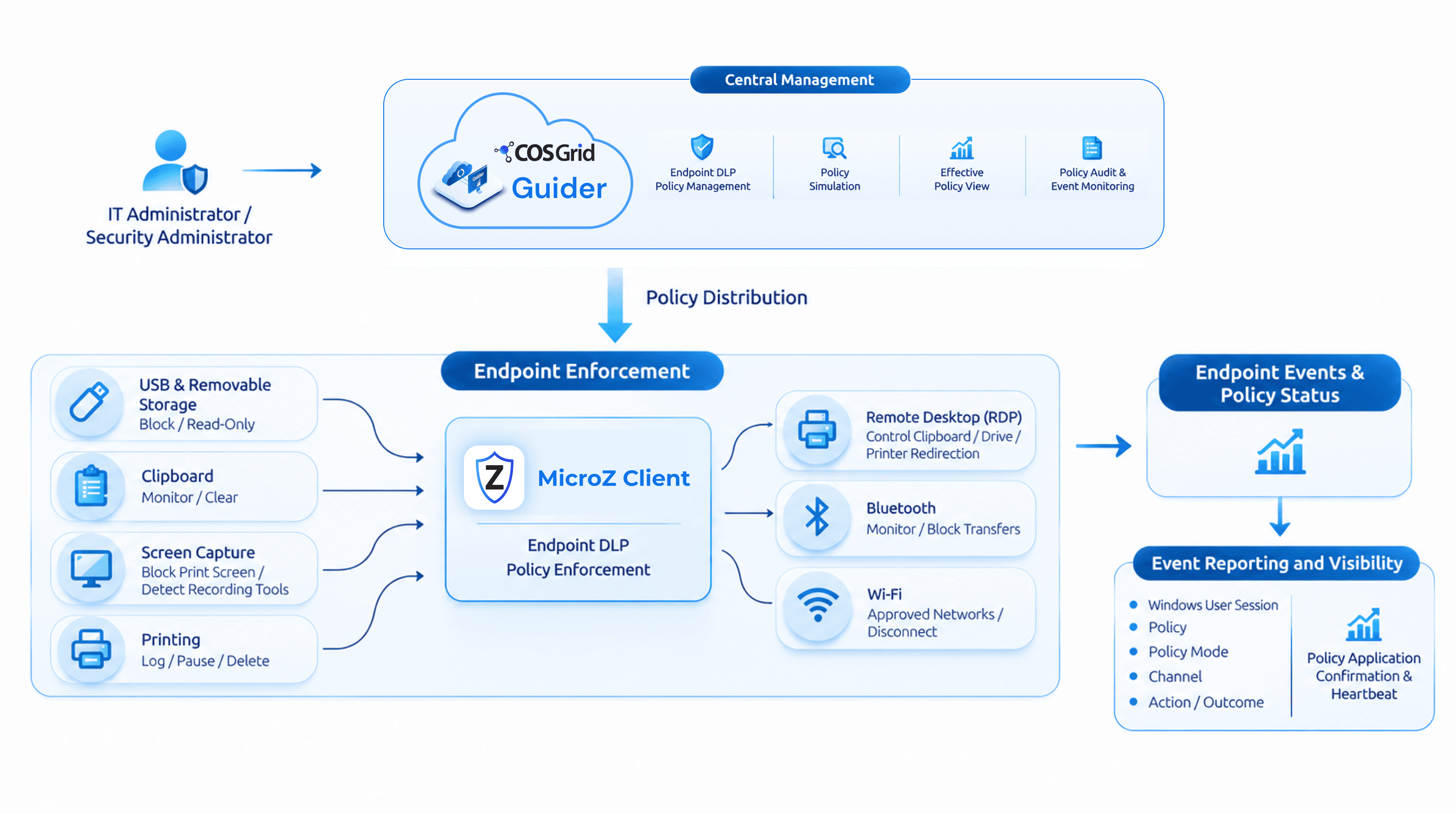
COSGrid Endpoint DLP is an endpoint data loss prevention solution that helps organisations control data movement through seven channels on managed Windows devices: USB, clipboard, screen capture, printing, remote desktop redirection, Bluetooth and Wi-Fi. Policies are managed centrally through COSGrid Guider and enforced directly on the device by the COSGrid MicroZ Client.
Centralised policies. Endpoint-level protection.
 How It WorksPolicy Workflow
Configured centrally in COSGrid Guider
Create policies for individual users or teams, configure controls for all seven channels, and define exclusions and tenant-wide defaults.
Preview before you save
Preview policy changes before saving them and review the effective policy for individual users to see which settings will apply.
Applied by the MicroZ Client
The MicroZ Client enforces configured policies on managed Windows endpoints. Start with monitor mode to observe activity before enforcing.
Events and policy information in Guider
See which policy was applied, which user and session were involved, which channel was affected and what action was recorded.
Challenges
Employees may copy customer information to USB and other removable storage.

Confidential documents can be printed and taken out of the organisation.

Information can be transferred through clipboard, drive and printer redirection in remote desktop sessions.

Devices can connect to unapproved Wi-Fi networks outside the organisation's control.
Features




Differentiators
Benefits
Use cases

Protect customer records, account details, transaction information and financial reports across banks, NBFCs and fintech organisations. Apply endpoint DLP policies to restrict USB transfers, control clipboard activities and printing, and enforce approved Wi-Fi network restrictions to prevent unauthorised data movement across managed devices.
Safeguard policyholder information, claims records and confidential insurance documents accessed by employees, agents and third-party vendors. Control USB access, clipboard operations and printing, while restricting drive, clipboard and printer redirection during supported remote desktop sessions.

Protect client information, source code, project documents and business-critical data handled by IT teams and distributed delivery centres. Enforce endpoint controls for USB storage, clipboard transfers, screen capture and printing, while monitoring data movement across managed devices.

Introduce endpoint DLP across departments, branch offices and distributed teams through a phased rollout. Start with simulation and monitor modes to assess risks, then progressively enforce USB, clipboard, screen capture, printing, remote desktop and network access policies without disrupting business operations.
Organisations handling personal, financial and confidential information need appropriate safeguards to reduce the risk of unauthorised data disclosure.

Personal data protection controls and supporting audit evidence.

Endpoint security enforcement and policy audit records.

Endpoint monitoring, data protection and security event records.

IEndpoint safeguards and data leakage monitoring evidence.

Payment card data detection and endpoint channel controls.

Data leakage prevention and endpoint security control evidence.
Have a question about Endpoint DLP?
 What is COSGrid Endpoint DLP?
 Which operating systems are supported?Does Endpoint DLP require a separate agent?
Sensitive information moves through everyday activities on employee devices. Give your security team greater control over these activities with centrally managed policies, device-level enforcement and detailed endpoint visibility.
Start with a two-week monitor-mode assessment on a pilot group. Understand observed endpoint activity, evaluate the impact of configured controls and plan a phased enforcement rollout.
Centralised Policy Management. Device-Level Enforcement. Greater Endpoint Visibility.
Necessary Cookies
Performance Cookies
Targetting Cookies
Functional Cookies

