COSGrid CASB
Gain visibility into SaaS usage. Control corporate account access. Apply file-transfer policies.
01 — OVERVIEW
How Does COSGrid CASB Work?
COSGrid CASB (Cloud Access Security Broker) helps organisations manage and control how users access supported Software-as-a-Service (SaaS) applications. It provides visibility into supported SaaS usage and enables organisations to apply policies governing corporate and personal account access and file-transfer activities.
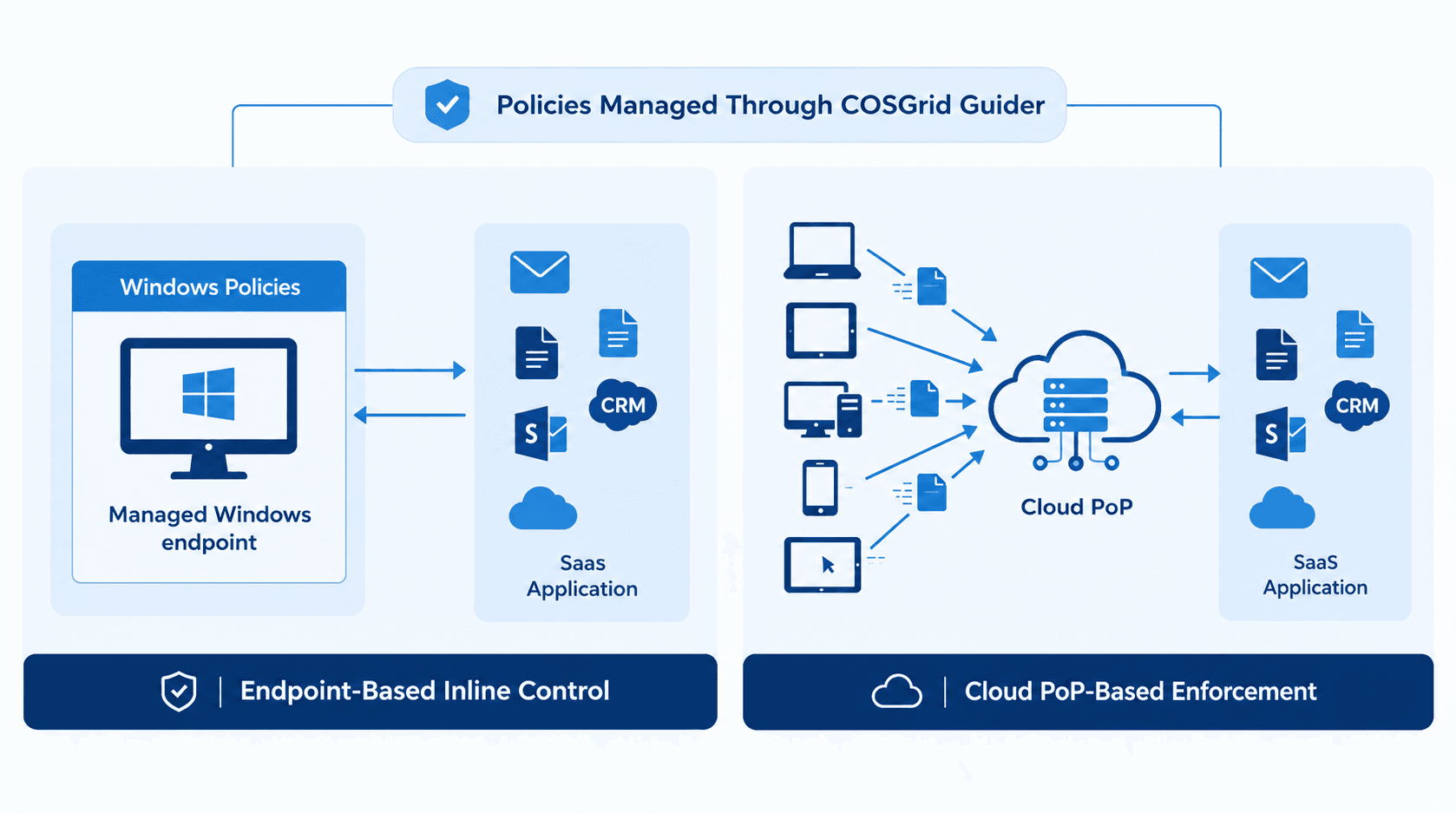
COSGrid CASB supports an endpoint-based inline control model using Windows policies and also supports a cloud Point of Presence (PoP) model. These approaches help organisations apply relevant SaaS access controls according to their deployment requirements.
With COSGrid CASB, administrators can configure policies for supported applications, control access to corporate and personal accounts, and manage supported file-transfer activities. This helps security teams establish consistent rules for SaaS usage while allowing employees to continue using the cloud applications required for their work.
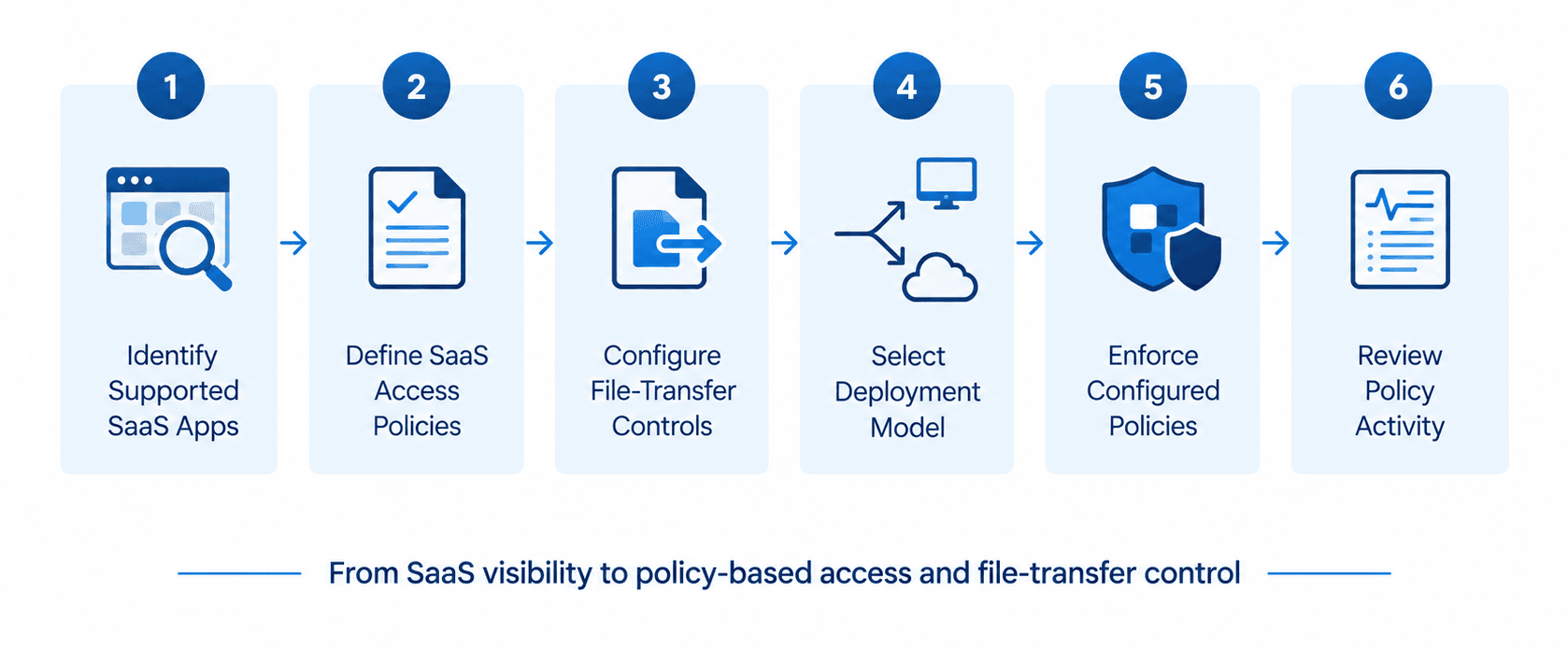
The core principle is simple: identify supported SaaS applications, define access and file-transfer policies, enforce the configured controls, and review the resulting activity.
02 — CASB FUNDAMENTALS
What is a Cloud Access Security Broker?
A Cloud Access Security Broker (CASB) helps organisations apply security policies to the use of cloud applications and SaaS services.
As businesses increasingly rely on cloud applications, employees may access the same service using corporate and personal accounts or transfer files through supported SaaS platforms. Without appropriate controls, organisations can have difficulty maintaining consistent oversight of these activities.
COSGrid CASB helps address these challenges by providing SaaS visibility and policy-based controls for supported applications.
It helps organisations:
- Discover and filter supported SaaS applications.
- Apply controls to supported corporate and personal account sign-ins.
- Configure policies for file-transfer activities.
- Manage SaaS access controls through endpoint-based inline enforcement or a cloud PoP deployment model.
- Establish consistent control policies for SaaS usage.
03 — ARCHITECTURE AND COMPONENTS
COSGrid CASB Architecture
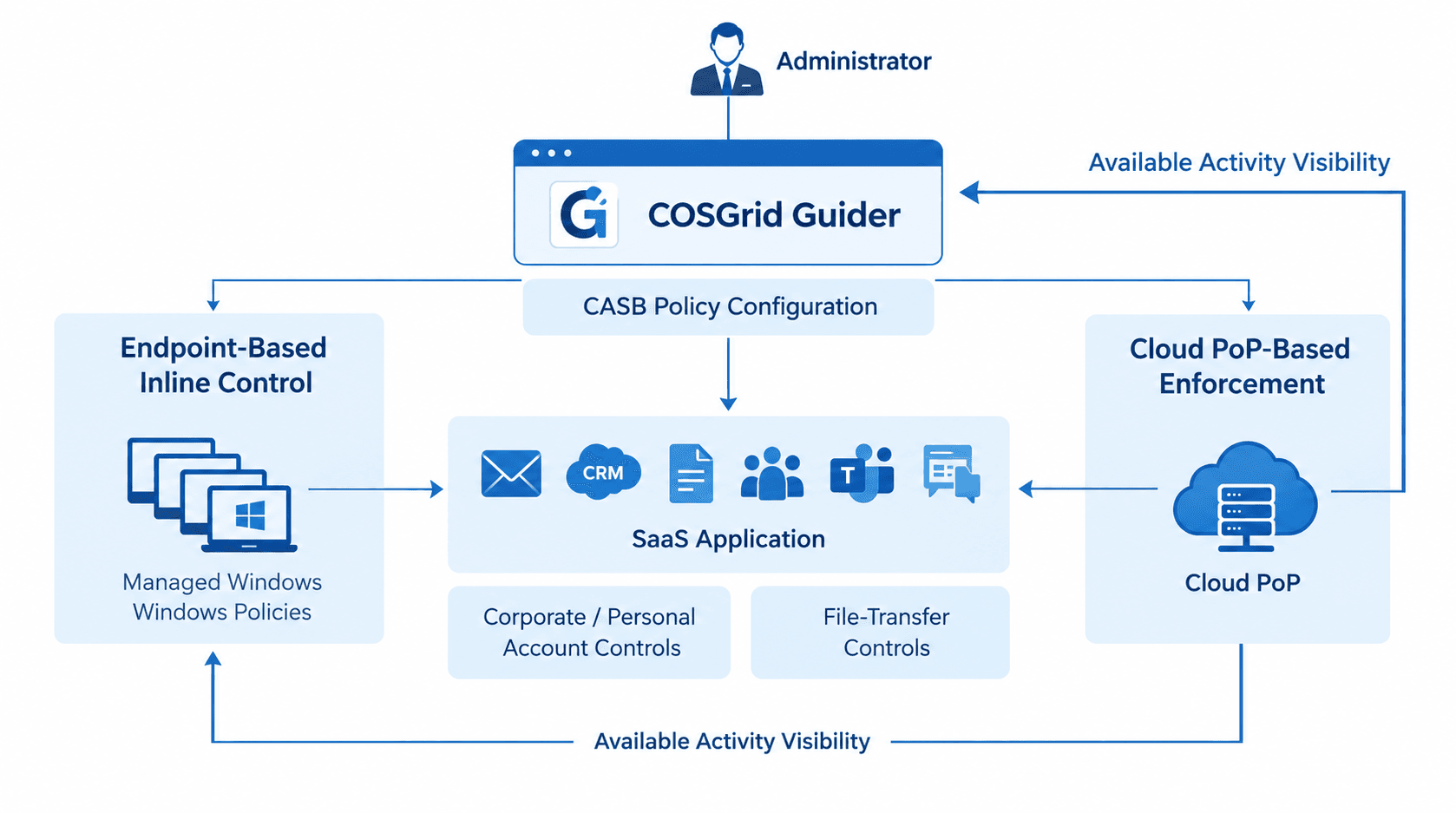
COSGrid CASB brings together policy management, SaaS activity control, enforcement, and operational visibility.
COSGrid Guider provides the central management interface for configuring and managing supported CASB policies. Administrators use the platform to define the required controls and manage their application to the relevant deployment.
In the endpoint-based deployment model, Windows policies are used to control supported SaaS activity. This approach enables organisations to apply configured controls through the supported endpoint environment.
COSGrid CASB also supports a cloud PoP model. This provides an additional deployment approach for applying supported SaaS security controls through the cloud-based enforcement architecture.
COSGrid CASB provides visibility into supported SaaS applications and enables policy-based control over supported corporate and personal account sign-ins.
Administrators can configure supported policies governing file-transfer activities within supported SaaS applications, helping organisations manage how files are handled through these services.
Centralised policy management and available activity information help administrators review configured controls and support operational oversight.
04 — CASB WORKFLOW
How Does COSGrid CASB Work Step by Step?
Step 1: Identify Supported SaaS Applications
Identify the SaaS applications within the supported application scope that the organisation wants to manage. COSGrid CASB helps provide visibility into supported SaaS applications and enables administrators to filter them according to their requirements.
Step 2: Define SaaS Access Policies
Administrators configure policies for supported SaaS usage. These policies can address corporate and personal account sign-ins, helping organisations establish which account-access behaviours are permitted or restricted.
Step 3: Configure File-Transfer Controls
Where supported, administrators configure policies governing file-transfer activities within SaaS applications. The selected controls determine how applicable file-transfer actions are handled.
Step 4: Select the Deployment Model
COSGrid CASB supports an endpoint-based inline model using Windows policies and a cloud PoP model. The appropriate deployment approach depends on the organisation's requirements and supported implementation.
Step 5: Enforce Configured Policies
The selected enforcement model applies the configured controls to supported SaaS activity. Depending on the policy, applicable account sign-ins or file-transfer activities can be allowed or restricted.
Step 6: Review Policy Activity
Administrators can use the available management and activity information to review policy configuration and support ongoing operational oversight.
05 — SAAS VISIBILITY
How Does COSGrid CASB Provide SaaS Visibility?
Organisations use a wide range of SaaS applications for communication, collaboration, document management, and business operations. Understanding which supported applications are in use is an important step towards applying consistent cloud access policies.
COSGrid CASB provides visibility into supported SaaS applications and enables administrators to filter applications according to their security and operational requirements.
With SaaS visibility, organisations can:
- Identify supported SaaS applications within the available visibility scope.
- Filter supported applications according to policy requirements.
- Determine which applications require additional access controls.
- Establish a consistent approach to supported SaaS usage.
This visibility helps security and IT teams make informed decisions about which SaaS applications should be permitted or restricted under organisational policy.
06 — CORPORATE AND PERSONAL ACCOUNT CONTROL
How Does COSGrid CASB Control SaaS Account Access?
Employees may use both corporate and personal accounts when accessing the same SaaS service. This can make it difficult for organisations to ensure that work-related activity remains within approved corporate accounts.
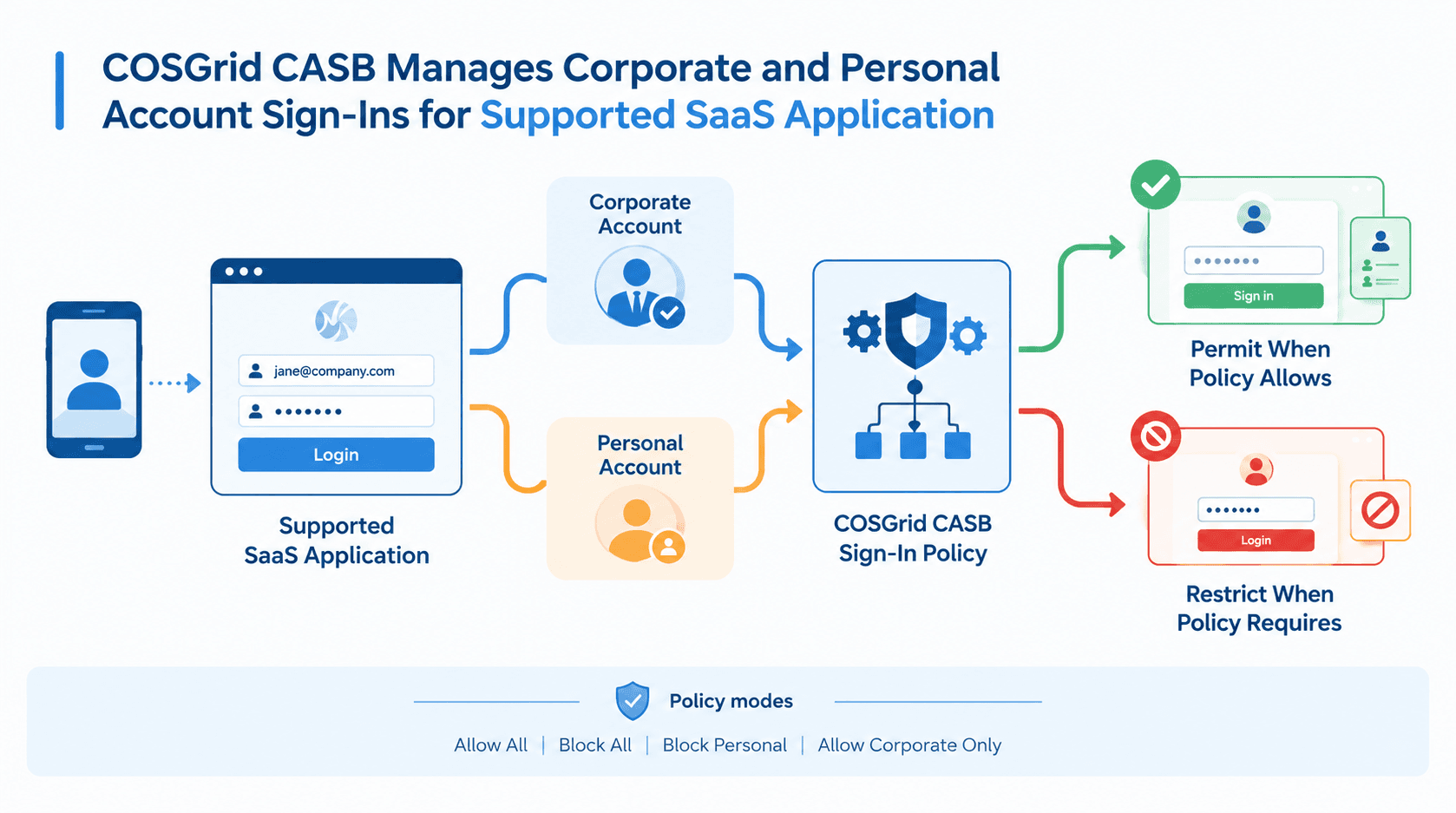
COSGrid CASB provides supported sign-in controls that help organisations apply policies to corporate and personal account access.
Depending on the supported application and configured policy, administrators can select an appropriate account-access mode.
Permit supported sign-in activity according to the configured Allow All policy.
Restrict supported sign-in activity according to the configured Block All policy.
Restrict personal-account sign-ins while allowing permitted corporate-account access, subject to supported application behaviour and policy configuration.
Permit supported corporate-account sign-ins while restricting personal-account sign-ins according to the configured policy.
These controls help organisations establish clearer boundaries between approved corporate account usage and personal account access on supported SaaS services.
07 — FILE-TRANSFER CONTROL
How Does COSGrid CASB Control File Transfers?
File transfers are a routine part of SaaS collaboration. However, organisations may need to restrict or manage file-related activities within supported cloud applications to align with internal security requirements.
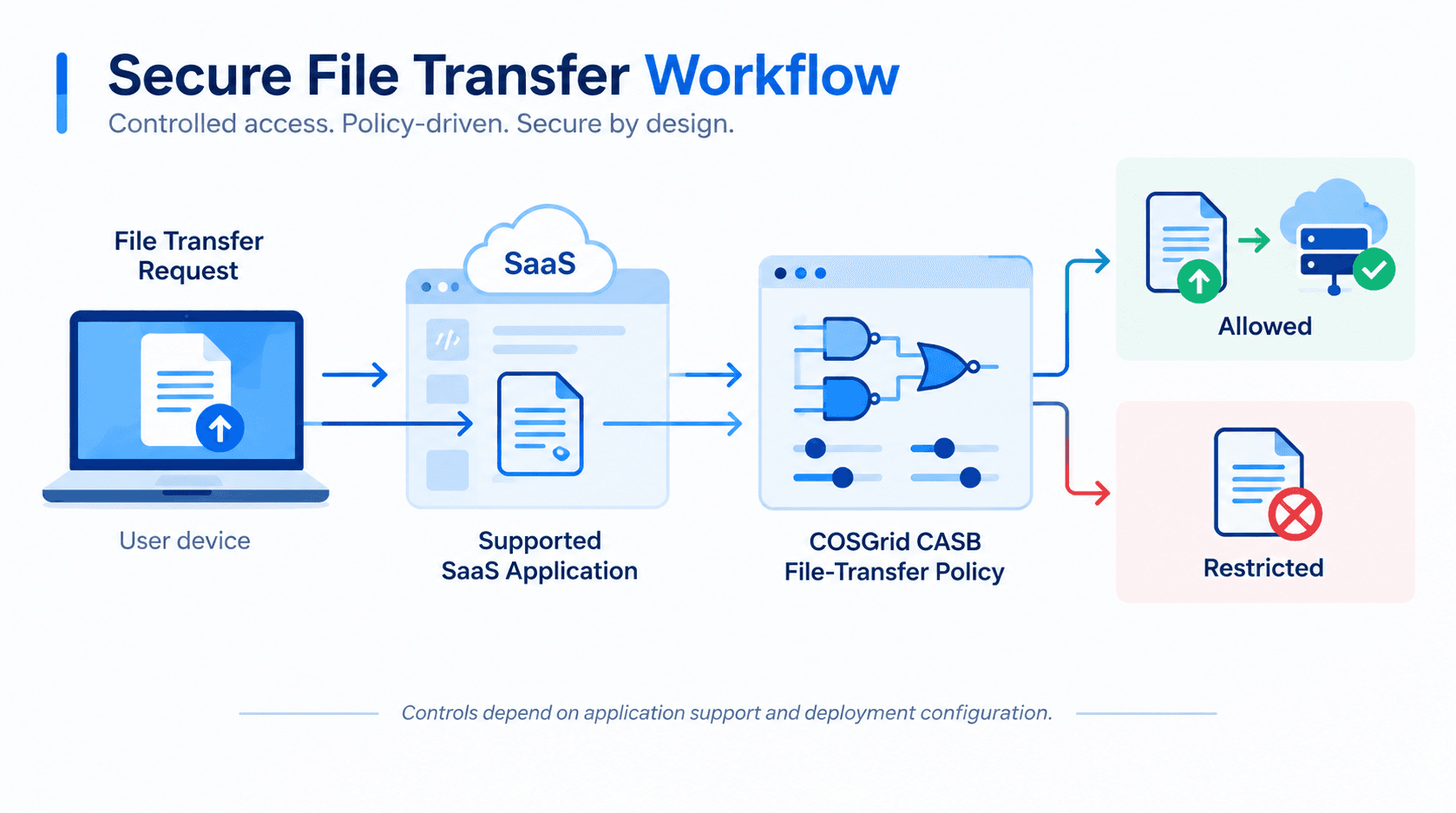
COSGrid CASB provides supported file-transfer controls that allow administrators to define how applicable activities should be handled.
The workflow includes:
- Select the application scope: Identify the supported SaaS applications to which the file-transfer policy applies.
- Configure the policy: Define the permitted or restricted file-transfer behaviour supported by the application and deployment.
- Apply the policy: Enforce the configured control through the selected CASB deployment model.
- Review available activity: Use available management and activity information to support operational oversight.
These controls help organisations manage file-transfer activity within supported SaaS applications according to their configured policies.
08 — DEPLOYMENT MODELS
How Can COSGrid CASB Be Deployed?
COSGrid CASB supports two deployment approaches: endpoint-based inline control and a cloud Point of Presence model.
This model uses supported Windows endpoint policies to control applicable SaaS activity.
It is suited to scenarios where organisations want to apply supported SaaS controls through the endpoint environment. The available controls depend on the supported applications and the endpoint deployment configuration.
The cloud PoP model provides a cloud-based approach to enforcing supported SaaS security policies.
This model can be considered where the organisation's architecture and requirements call for cloud-based policy enforcement. The precise capabilities and traffic coverage depend on the configured deployment and supported implementation.
The appropriate model depends on the organisation's SaaS environment, endpoint requirements, traffic architecture, and policy enforcement needs. Confirm application coverage and control availability for the selected deployment before rollout.
09 — POLICY MANAGEMENT AND ENFORCEMENT
How Are COSGrid CASB Policies Applied?
COSGrid CASB enables administrators to configure policies for supported SaaS applications and their associated account-access and file-transfer activities.
Identify the supported SaaS applications that require visibility and control.
Configure the appropriate supported sign-in mode to manage corporate and personal account access.
Define supported restrictions for file-transfer activities in the selected applications.
Apply the policies through the endpoint-based inline model or cloud PoP model, according to the deployment.
Enforce the configured controls and use the available management and activity information to review the policy setup and support ongoing administration.
A clear policy workflow helps organisations align SaaS usage with internal security requirements while keeping policy management centralised.
10 — EXAMPLE USER JOURNEY
COSGrid CASB in Action: Managing Corporate SaaS Access
Consider an organisation that uses a cloud collaboration application for everyday business operations. Employees need access to the corporate account, but the organisation wants to restrict personal-account sign-ins and apply controls to supported file-transfer activities.
Here is how COSGrid CASB can help:
- Identify the SaaS application: The administrator identifies the supported application that requires control.
- Define the account policy: The administrator configures the applicable corporate and personal account sign-in restrictions.
- Configure file-transfer rules: The administrator sets the supported file-transfer controls required by the organisation.
- Choose the enforcement model: The organisation deploys the endpoint-based inline or cloud PoP approach.
- Apply the policy: The configured controls are enforced for applicable supported SaaS activity.
- Review the configuration: The administrator uses available management and activity information to support operational oversight.
This workflow helps the organisation manage supported SaaS account access and file-transfer activities through a defined policy framework.
11 — COMMON USE CASES
Where Can COSGrid CASB Be Used?
Help ensure that users access supported SaaS applications through approved corporate accounts according to configured policies.
Apply supported restrictions to personal-account sign-ins on selected SaaS services.
Identify and filter supported SaaS applications to help establish a more controlled cloud application environment.
Configure supported policies for file-transfer activities within selected SaaS applications.
Centralise supported SaaS access and file-transfer policy configuration to simplify administration.
Choose between endpoint-based inline control and the cloud PoP model according to the organisation's architecture and supported implementation.
12 — KEY BENEFITS
What Does COSGrid CASB Help Organisations Achieve?
Greater SaaS visibility: Understand supported SaaS application usage within the available visibility scope.
Corporate account control: Apply supported policies to corporate and personal account sign-ins.
File-transfer governance: Manage supported file-transfer activities according to organisational requirements.
Centralised administration: Configure supported CASB policies through COSGrid Guider.
Deployment flexibility: Choose an endpoint-based inline or cloud PoP deployment model.
Policy-based enforcement: Apply consistent controls to supported SaaS activities based on configured requirements.
13 — FAQS
Frequently Asked Questions About COSGrid CASB

What is COSGrid CASB?
COSGrid CASB is a Cloud Access Security Broker solution that helps organisations manage supported SaaS application usage through visibility and policy-based controls for account access and file-transfer activities.
How does COSGrid CASB work?
Administrators configure policies for supported SaaS applications, account sign-ins, and file-transfer activities. The configured policies are enforced through the selected endpoint-based inline or cloud PoP deployment model.
What does CASB stand for?
CASB stands for Cloud Access Security Broker. It is a security approach that helps organisations apply policies and controls to cloud application usage.
What SaaS applications does COSGrid CASB support?
COSGrid CASB provides visibility and controls for supported SaaS applications. Confirm the current supported application list with COSGrid before deployment.
Can COSGrid CASB distinguish between corporate and personal accounts?
COSGrid CASB supports account sign-in controls for supported applications, including policies designed to restrict personal-account access and permit corporate-account access according to the configured mode.
Does COSGrid CASB support file-transfer controls?
Yes. COSGrid CASB supports policies governing file-transfer activities within supported SaaS applications. The available controls depend on the application and deployment configuration.
Does COSGrid CASB support cloud-based deployment?
Yes. COSGrid CASB supports a cloud Point of Presence (PoP) model in addition to its endpoint-based inline control model.

