COSGrid DLP
Understand how COSGrid DLP helps protect sensitive data across managed Windows endpoints.
01 — OVERVIEW
How Does COSGrid DLP Work?
COSGrid DLP is an endpoint Data Loss Prevention solution designed to help organisations reduce the risk of sensitive data exposure through endpoint activities. It enables security teams to define data protection policies, apply controls across supported Windows endpoint channels, and monitor policy-related activity through COSGrid Guider.
Using the COSGrid MicroZ Client on managed Windows devices, COSGrid DLP applies configured controls to activities such as USB storage, clipboard operations, screen capture, printing, remote desktop redirection, Bluetooth, and Wi-Fi.
Administrators can configure policies for users and teams, identify sensitive data using built-in data types and custom patterns, review policy impact, and monitor endpoint events centrally.
The goal is to help organisations maintain greater control over how sensitive information is accessed, handled, and transferred through supported endpoint channels.
The core principle is simple: define the policy, enforce it at the endpoint, and maintain visibility into data protection activity.
02 — DLP FUNDAMENTALS
What is Endpoint Data Loss Prevention?
Endpoint Data Loss Prevention, or endpoint DLP, helps organisations control activities that could expose sensitive information through user devices.
Employees regularly work with confidential documents, financial records, customer information, and other business data. Without appropriate controls, information may be copied to removable storage, transferred through the clipboard, printed, captured from the screen, or exposed through other endpoint activities.
Endpoint DLP helps reduce these risks by applying policies to supported device channels and sensitive data handling activities.
COSGrid DLP provides endpoint-focused controls that help organisations:
- Control supported data transfer and device activities.
- Identify selected types of sensitive information.
- Apply policies to users and teams.
- Review policy impact before enforcement.
- Monitor endpoint events and maintain an audit trail.
03 — ARCHITECTURE AND COMPONENTS
COSGrid DLP Architecture
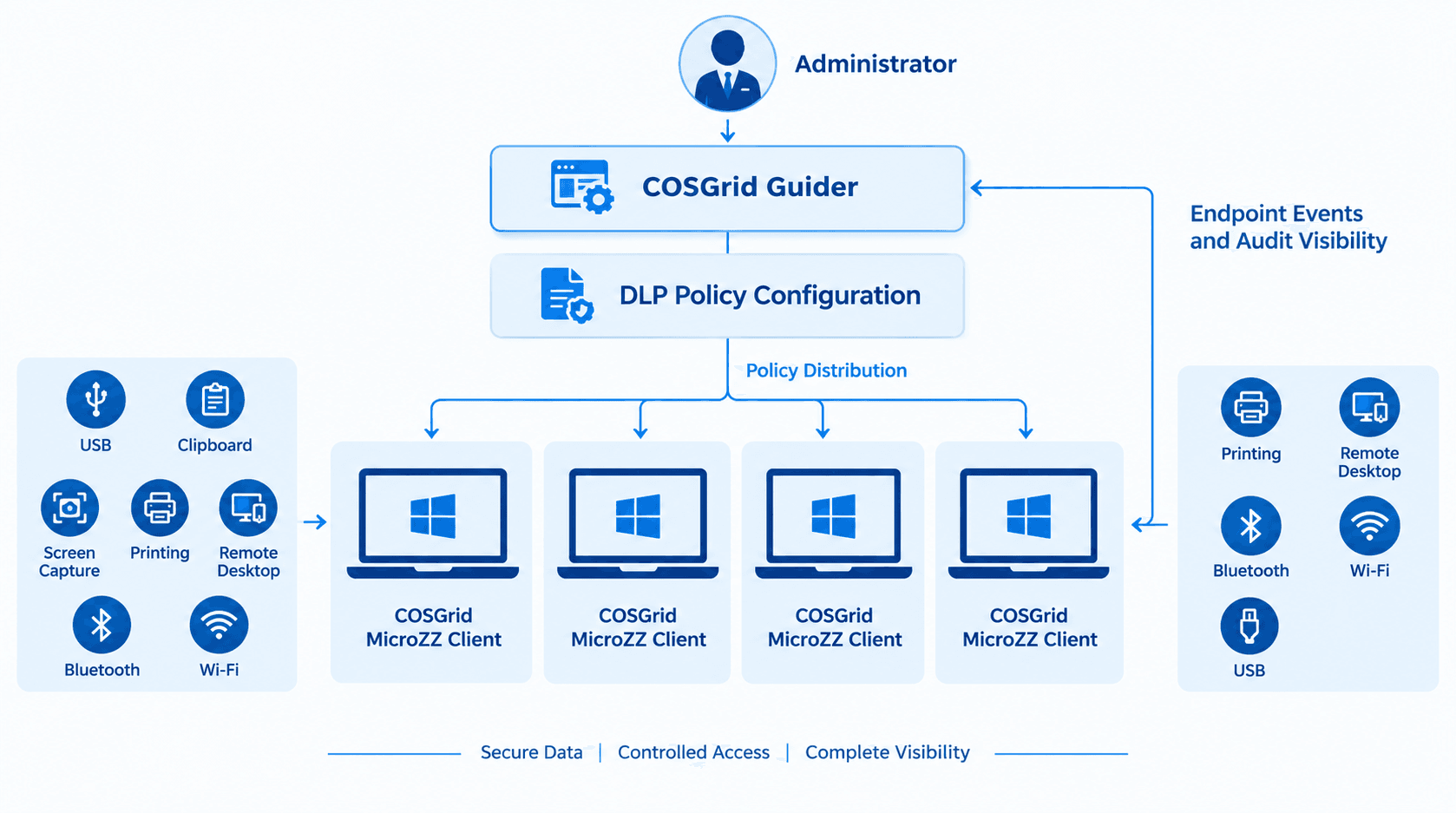
COSGrid DLP brings together centralised policy management, endpoint enforcement, sensitive data detection, and activity visibility.
COSGrid Guider
COSGrid Guider provides the central management interface where administrators configure DLP policies, manage policy assignments, review effective policies, and access endpoint events and audit information.
COSGrid MicroZ Client
The COSGrid MicroZ Client runs on managed Windows endpoints and supports the enforcement of configured endpoint DLP controls.
DLP Policy Engine
Configured policies define the controls applicable to users, teams, and supported endpoint channels. Policy assignments and overlapping rules determine the effective controls applied to a device.
Sensitive Data Detection
COSGrid DLP supports 47 built-in sensitive data types, including Aadhaar numbers, PAN, payment card information, bank account numbers, and cloud keys or secrets. Administrators can also configure custom patterns for supported detection requirements.
Endpoint Activity and Audit Visibility
Endpoint events and policy changes can be reviewed centrally through COSGrid Guider, helping administrators understand policy activity and investigate relevant events.
04 — DLP WORKFLOW
How Does COSGrid DLP Work Step by Step?
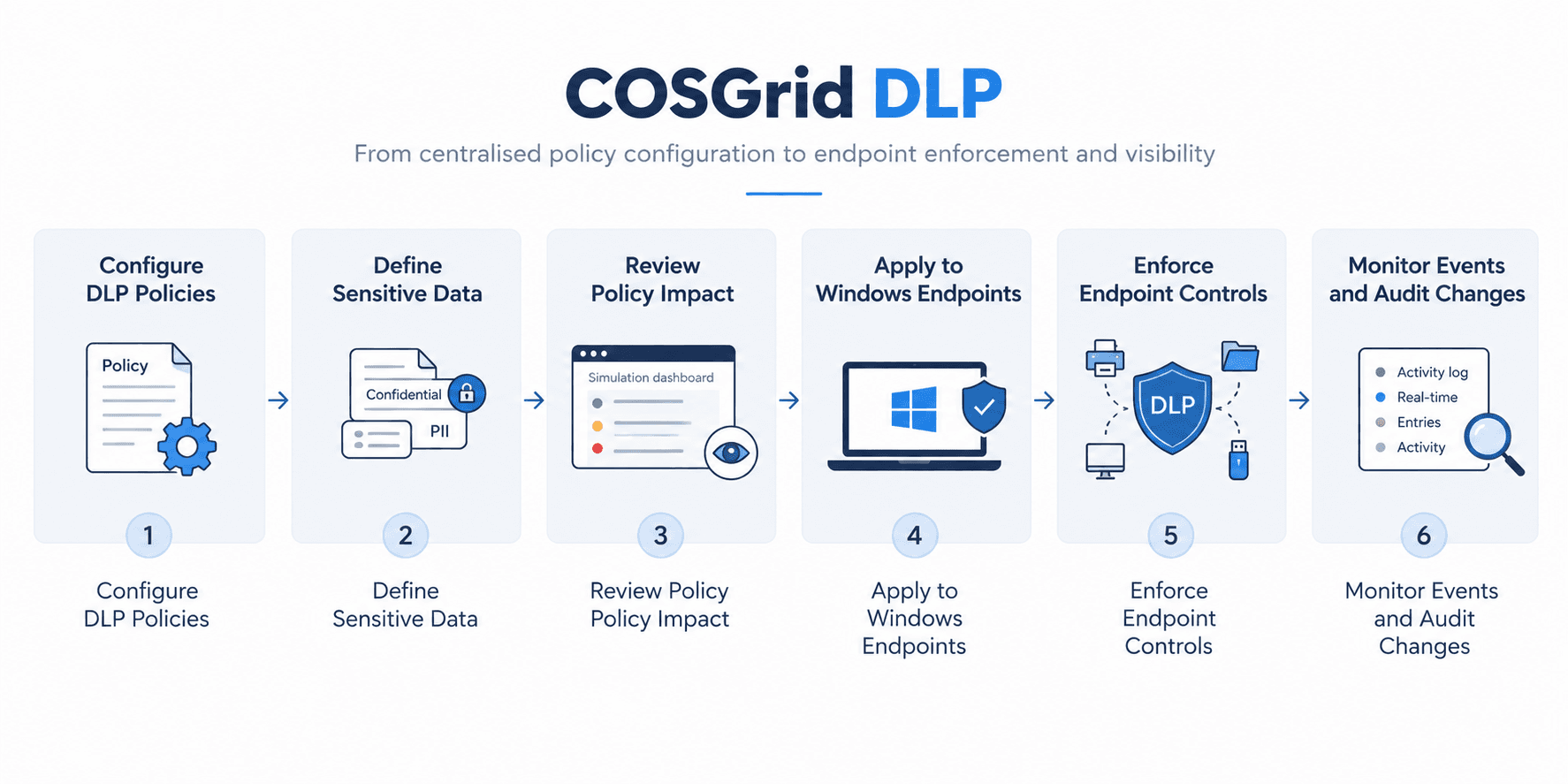
Step 1: Configure Data Protection Policies
Administrators define endpoint DLP policies in COSGrid Guider based on organisational requirements. Policies can be configured for specific users or teams, with exclusions and a tenant-wide default policy where required.
Step 2: Define Sensitive Data Detection
Administrators select from supported built-in sensitive data types or configure custom patterns to address their data protection requirements.
Examples include Aadhaar numbers, PAN, payment card information, bank account numbers, and cloud keys or secrets.
Step 3: Review Policy Impact
Before enforcing a policy, administrators can use policy simulation and monitor mode to review expected policy behaviour and observe activity without immediately applying blocking actions.
This helps teams validate configurations and refine policies before enforcement.
Step 4: Apply Policies to Managed Endpoints
Configured policies are applied through the COSGrid MicroZ Client on managed Windows devices. The effective policy determines which controls apply to the device and its supported endpoint activities.
When multiple policies overlap, the strictest applicable setting takes precedence. Changes to team membership take effect at the next device check-in.
Step 5: Enforce Endpoint Controls
Based on the configured policy, COSGrid DLP can apply supported controls to removable storage, clipboard operations, screen capture, printing, remote desktop redirection, Bluetooth, and Wi-Fi.
Depending on the control, the action may include blocking, restricting, logging, or limiting the relevant activity.
Step 6: Monitor Activity and Audit Changes
Administrators can review endpoint events through COSGrid Guider, inspect effective policy settings, and examine policy change history, including before-and-after values.
This provides a central view of DLP configuration and relevant endpoint activity.
05 — ENDPOINT CONTROL CHANNELS
How Does COSGrid DLP Control Data Movement?
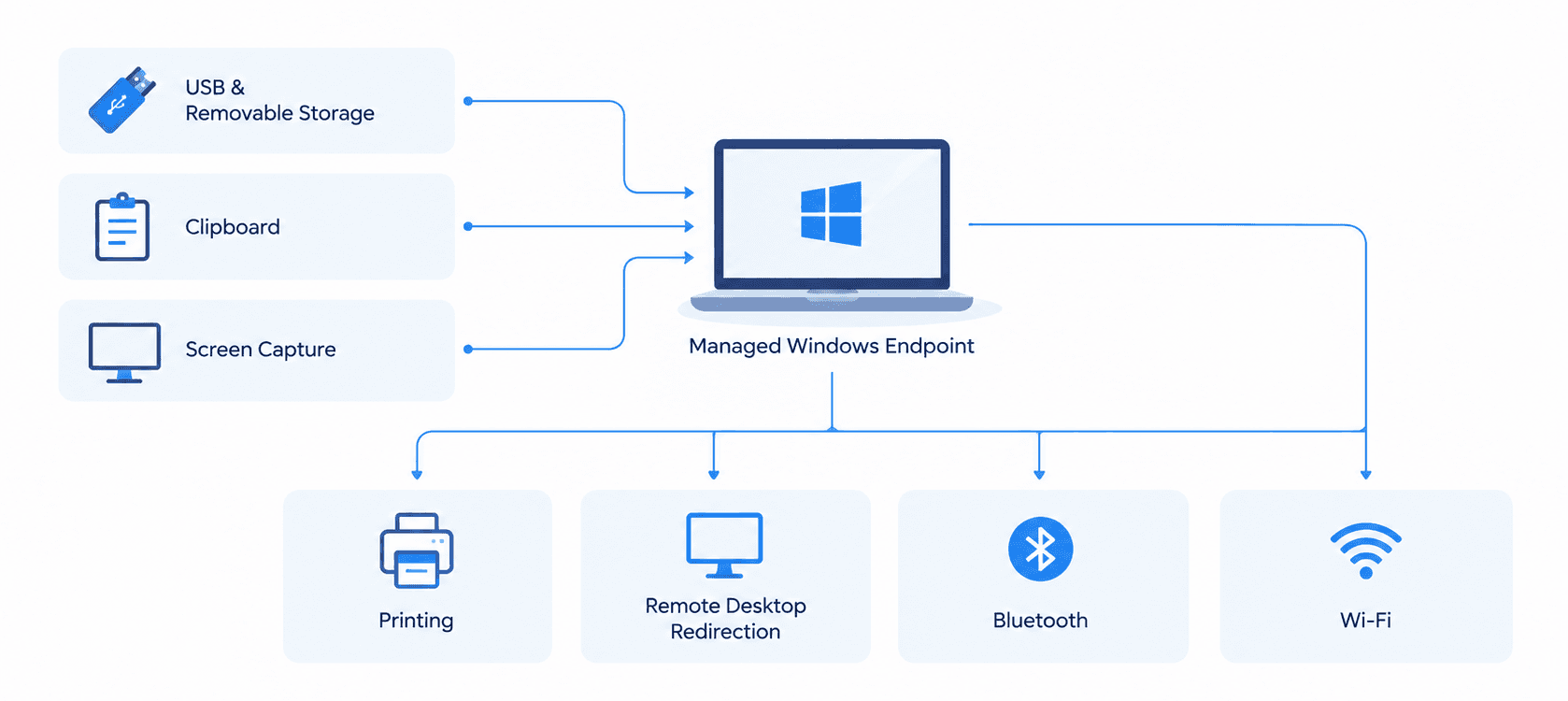
COSGrid DLP applies configured policies across supported Windows endpoint channels to help reduce the risk of sensitive information leaving the intended environment.
Removable Storage and USB
Control how users interact with supported removable storage devices. Depending on policy configuration, USB access can be blocked or restricted to read-only operation.
Clipboard
Apply controls to clipboard activity, including supported clipboard clearing and logging actions, to help reduce unauthorised copying of information between applications.
Screen Capture
Apply supported controls to Print Screen activity and detect activity involving supported screen-recording tools.
Printing
Configure printing restrictions and supported controls such as print job limits, logging, pausing, or deleting print jobs.
Remote Desktop Redirection
Control supported remote desktop redirection channels, including redirected clipboard, drives, and printers, according to configured policy.
Bluetooth
Apply configured controls to supported Bluetooth activity, including logging or blocking where available.
Wi-Fi
Configure approved-network allowlisting and supported Wi-Fi controls, including logging or disconnection from networks that do not meet the configured requirements.
The exact actions available depend on the supported endpoint channel and the applicable policy configuration.
06 — SENSITIVE DATA DETECTION
How Does COSGrid DLP Identify Sensitive Data?
Effective data protection starts with identifying the information an organisation needs to protect.
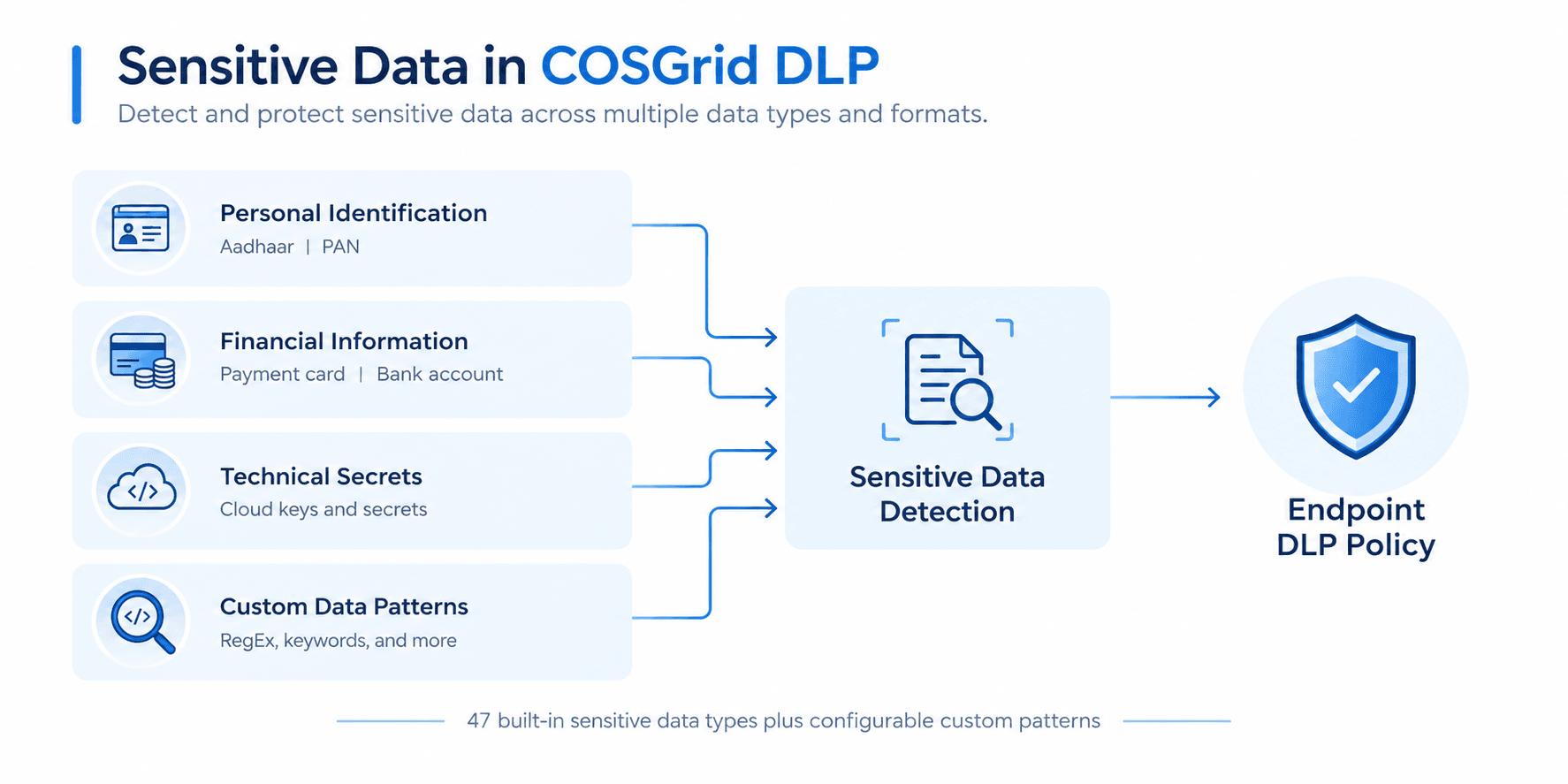
COSGrid DLP supports 47 built-in sensitive data types, covering selected categories of personal, financial, and technical information. Administrators can also define custom patterns for specific data formats relevant to their organisation.
Examples of supported detection categories include:
- Personal identification: Aadhaar numbers and PAN.
- Financial information: Payment card details and bank account numbers.
- Technical secrets: Cloud keys and secrets.
- Custom data patterns: Organisation-specific formats configured by administrators.
These detection capabilities help organisations configure policies around recognised sensitive data types and their own data protection requirements.
07 — POLICY MANAGEMENT
How Are DLP Policies Configured and Applied?
COSGrid DLP allows administrators to manage endpoint data protection policies centrally through COSGrid Guider.
User and Team-Based Policies
Assign policies according to organisational roles, teams, or individual user requirements.
Tenant-Wide Default Policy
Define a tenant-wide default to establish baseline controls where applicable.
Policy Exclusions
Configure exclusions where specific users, teams, or scenarios require different treatment within the supported policy model.
Effective Policy Evaluation
When policies overlap, the strictest applicable setting takes precedence. Administrators can review the effective policy to understand which settings apply.
Policy Simulation and Monitor Mode
Review expected policy impact and observe activity before introducing enforcement actions where appropriate.
Policy Change Audit Trail
Review policy changes with before-and-after values to support troubleshooting, governance, and audit activities.
08 — ENFORCEMENT AND MONITORING
From Policy Configuration to Endpoint Enforcement
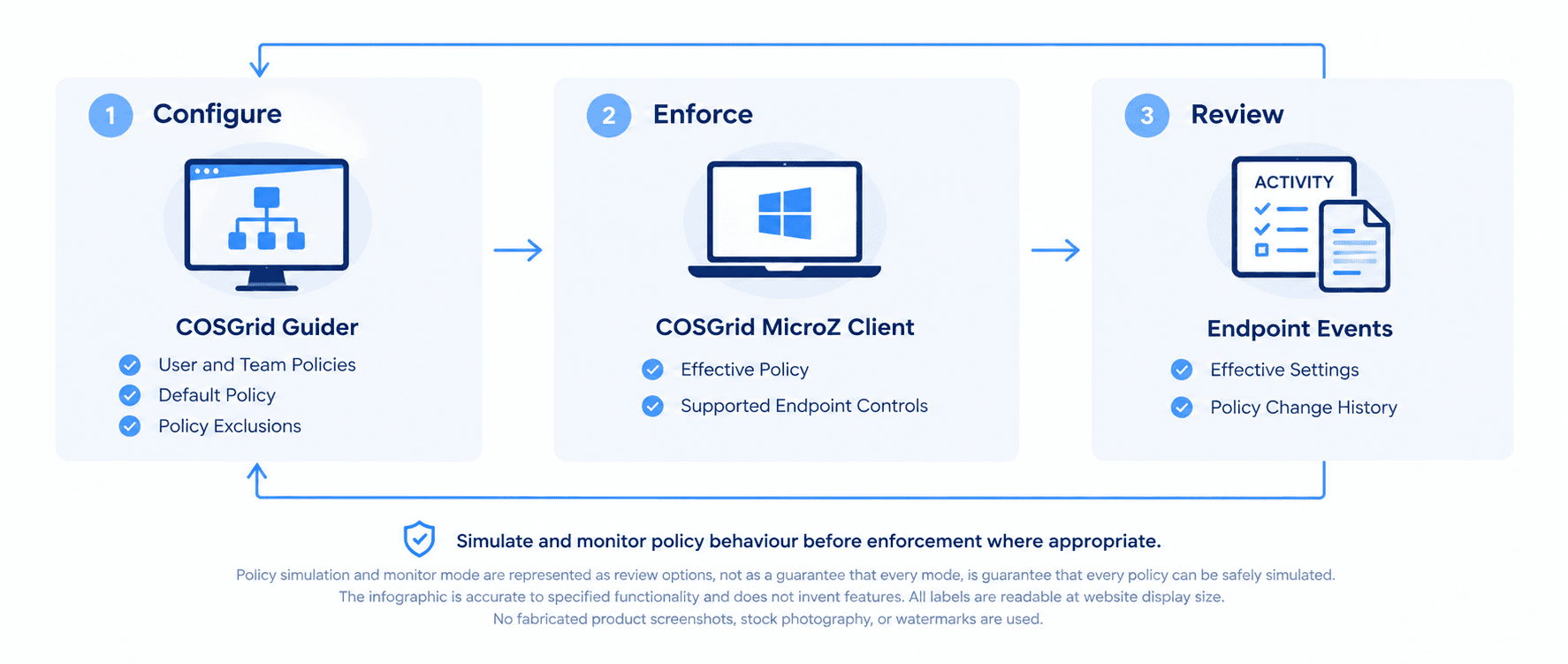
Endpoint DLP policies are useful only when they can be applied consistently and their behaviour can be reviewed. COSGrid DLP connects centralised policy configuration with endpoint controls through the COSGrid MicroZ Client.
Administrators configure the required rules in COSGrid Guider. The applicable policy is then used by the managed endpoint to enforce supported controls. Relevant endpoint events can be reviewed centrally to understand how configured controls are operating.
The workflow supports three important activities:
Configure: Define policies, sensitive data patterns, and endpoint restrictions.
Enforce: Apply supported controls on managed Windows endpoints according to the effective policy.
Review: Inspect endpoint events, effective policy settings, and policy change history through COSGrid Guider.
Policy simulation and monitor mode help teams evaluate configurations before moving to enforcement where appropriate.
09 — VISIBILITY AND AUDITABILITY
How Does COSGrid DLP Support Security Monitoring?
Centralised visibility helps security teams understand how endpoint data protection policies are configured and how relevant endpoint activities are handled.
COSGrid Guider supports visibility into:
- Endpoint DLP events.
- Effective policy settings.
- Policy changes and before-and-after values.
- Relevant activity associated with supported endpoint controls.
These records can help administrators investigate issues, review policy behaviour, and maintain evidence of policy configuration and changes.
COSGrid DLP can support an organisation's data protection and audit processes. Actual compliance depends on the organisation's policies, deployment, configuration, operational procedures, and applicable regulatory requirements.
10 — EXAMPLE USER JOURNEY
COSGrid DLP in Action: Protecting Sensitive Business Information
Consider an organisation whose finance team works with confidential financial records on managed Windows devices.
The security team wants to reduce the risk of employees transferring sensitive information to removable storage, copying it through the clipboard, or printing it without appropriate controls.
Here is how COSGrid DLP can help:
- Define the requirements: The administrator identifies the endpoint channels that require protection.
- Configure policies: The administrator creates appropriate controls in COSGrid Guider and assigns them to the relevant team.
- Select sensitive data types: Built-in data types or custom patterns are configured to address the organisation's requirements.
- Review the configuration: Policy simulation or monitor mode is used where appropriate to review expected behaviour.
- Apply endpoint controls: The effective policy is applied through the COSGrid MicroZ Client on managed Windows devices.
- Monitor activity: Relevant endpoint events and policy changes are reviewed through COSGrid Guider.
- Refine policies: The security team adjusts the configuration as business requirements evolve.
The result is a centrally managed approach to controlling supported endpoint data handling activities.
11 — COMMON USE CASES
Where Can COSGrid DLP Be Used?
Protecting Sensitive Employee and Customer Information
Apply endpoint controls to help reduce the risk of exposure involving personal identification and other sensitive information.
Financial Data Protection
Configure controls for supported endpoint activities involving financial records and sensitive business information.
USB and Removable Storage Control
Restrict supported removable storage operations to help prevent unauthorised copying of business data.
Print and Screen Capture Restrictions
Apply configured controls to supported printing and screen capture activities where sensitive information requires additional protection.
Remote Work Endpoint Protection
Manage supported data handling controls on managed Windows endpoints used by employees working across different locations.
Policy Governance and Audit Preparation
Maintain visibility into effective policies, relevant endpoint events, and policy changes to support internal governance and audit workflows.
12 — SECURITY AND GOVERNANCE PRINCIPLES
Key Principles Behind COSGrid DLP
Centralised policy management: Configure and review endpoint DLP policies through COSGrid Guider.
Endpoint-level enforcement: Apply supported controls through the COSGrid MicroZ Client on managed Windows devices.
Sensitive data awareness: Use built-in sensitive data types and custom patterns to address defined protection requirements.
Consistent policy evaluation: Apply the strictest applicable setting when policies overlap.
Controlled rollout: Use policy simulation and monitor mode to review configurations before enforcement where appropriate.
Visibility and accountability: Review relevant endpoint events, effective policy settings, and policy change history.
Operational flexibility: Configure policies for users and teams, with supported exclusions and tenant-wide defaults.
13 — FREQUENTLY ASKED QUESTIONS
Frequently Asked Questions About COSGrid DLP

What is COSGrid DLP?
COSGrid DLP is an endpoint Data Loss Prevention solution that helps organisations control supported data handling activities on managed Windows devices using the COSGrid MicroZ Client and centrally managed policies through COSGrid Guider.
How does COSGrid DLP work?
Administrators configure policies and sensitive data detection requirements in COSGrid Guider. The applicable policies are enforced through the COSGrid MicroZ Client on managed Windows endpoints, and relevant activity can be reviewed centrally.
Which endpoint channels does COSGrid DLP support?
Supported channels include removable storage and USB, clipboard, screen capture, printing, remote desktop redirection, Bluetooth, and Wi-Fi. Available actions depend on the channel and configured policy.
Can COSGrid DLP identify sensitive information?
COSGrid DLP supports 47 built-in sensitive data types, including Aadhaar numbers, PAN, payment card information, bank account numbers, and cloud keys or secrets. Administrators can also configure custom patterns.
Can DLP policies be assigned to specific teams?
Yes. Policies can be configured for users and teams, with supported exclusions and a tenant-wide default policy.
What happens when multiple DLP policies apply?
When policies overlap, the strictest applicable setting takes precedence. Administrators can review the effective policy to understand which settings apply to the endpoint.
Can administrators test DLP policies before enforcement?
COSGrid DLP supports policy simulation and monitor mode to help administrators review policy impact and observe activity before introducing enforcement actions where appropriate.
How can administrators monitor DLP activity?
Administrators can review relevant endpoint events through COSGrid Guider, inspect effective policy settings, and examine policy change history, including before-and-after values.
Does COSGrid DLP guarantee regulatory compliance?
No security product can independently guarantee compliance. COSGrid DLP can support data protection and audit processes, but compliance depends on the organisation's deployment, configuration, policies, operational practices, and applicable regulatory requirements.
How is COSGrid DLP different from CASB and TrustShield AI?
COSGrid DLP focuses on endpoint data protection controls across supported Windows endpoint channels. COSGrid CASB and TrustShield AI are separate products with distinct scopes. Their application-specific capabilities should be evaluated on their respective product pages.
14 — KEY TAKEAWAYS
COSGrid DLP: From Policy to Protection

Centralised management: Configure and review DLP policies through COSGrid Guider.
Endpoint enforcement: Apply supported data protection controls on managed Windows devices through the COSGrid MicroZ Client.
Sensitive data detection: Use 47 built-in sensitive data types and configurable custom patterns.
Multiple endpoint channels: Manage supported USB, clipboard, screen capture, printing, remote desktop redirection, Bluetooth, and Wi-Fi activities.
Controlled policy rollout: Use simulation and monitor mode to review policy behaviour where appropriate.
Policy clarity: Review effective settings and understand how overlapping policies are applied.
Audit visibility: Access relevant endpoint events and policy change history centrally.

